
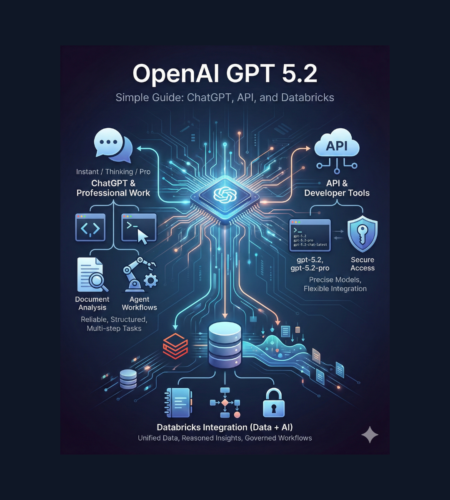
If you search “openai gpt 5.2” you’re probably trying to answer one basic question: What is it, and how can I use it for real work? This blog explains openai 5.2 in very simple words—how 5.2 chatgpt works, what the different versions mean (Instant / Thinking / Pro), what the model names are in the API, and how teams often use openai gpt 5.2 databricks for data + AI workflows.
What is OpenAI GPT 5.2?
OpenAI GPT 5.2 is a newer GPT model family built for professional work and “agent” style tasks (tasks that need multiple steps, tools, and long context). OpenAI describes it as stronger for things like spreadsheets, presentations, coding, working with images, longer documents, and multi-step projects.
In plain words: openai gpt 5.2 is meant to feel more reliable day-to-day and more capable on hard tasks than earlier versions.
What’s new in OpenAI 5.2 (in simple words)
Here are the practical improvements people care about:
- Better structured answers: clearer output and less messy formatting (important for work docs and reports).
- Stronger long-context work: better at understanding long documents and complex instructions.
- Stronger tool + workflow behavior: designed to behave more “disciplined” inside complex workflows (agents, tool-calling, multi-step tasks).
- Strong science/math performance: OpenAI highlights improvements on science and math benchmarks and research help use-cases.
The 3 versions you’ll hear about (Instant, Thinking, Pro)
When people say “openai gpt 5.2”, they often mean one of these:
1) GPT-5.2 Instant (fast)
Good for everyday questions, quick writing, how-tos, and fast help.
2) GPT-5.2 Thinking (deeper)
Better for hard tasks like coding, long-document summaries, step-by-step logic, planning, and careful decisions.
3) GPT-5.2 Pro (most precise)
OpenAI positions Pro as the “smartest and most trustworthy option” for difficult questions where higher quality is worth it.
This is why you may see people search 5.2 chatgpt — because ChatGPT can offer multiple GPT-5.2 options.
Model names: “5.2 ChatGPT” vs API names (important!)
This part confuses many users, so here’s the simple mapping.
In ChatGPT, you’ll see labels like:
- ChatGPT-5.2 Instant
- ChatGPT-5.2 Thinking
- ChatGPT-5.2 Pro
In the API, the names are:
- Instant →
gpt-5.2-chat-latest - Thinking →
gpt-5.2 - Pro →
gpt-5.2-pro
So when someone says “5.2 chatgpt”, they usually mean the ChatGPT product experience, but developers will care about the API model IDs above.
Pricing (quick, simple overview)
OpenAI lists token-based API pricing for GPT-5.2. For example, gpt-5.2 / gpt-5.2-chat-latest and gpt-5.2-pro have different rates, and cached input is cheaper.
(Prices can change, so always treat the official page as the source of truth.)
When should you use OpenAI GPT 5.2?
Use openai gpt 5.2 when you want:
- Better coding help (debugging, refactors, UI building, multi-file thinking)
- Document analysis (long PDFs, policies, research notes, contracts, meeting docs)
- Professional writing (emails, briefs, reports with clean formatting)
- Science + math support (multi-step reasoning, careful calculations, research workflows)
- Agent workflows (multi-step tasks that use tools and follow a process)
Prompting tips that work well for OpenAI 5.2
OpenAI’s own prompting guide emphasizes that GPT-5.2 is powerful, but it still responds best when you are clear about what you want. OpenAI Cookbook
Here are simple rules:
- Say the goal in one line
Example: “Create a one-page summary for a busy manager.” - Ask for the output shape
Example: “Give me: (1) key points, (2) risks, (3) next actions.” - Tell it what to avoid
Example: “No fluff. No long intro. Use simple words.” - Give examples when you want a specific style
Example: paste a small sample of the format you like.
These small steps usually improve quality a lot—especially in professional writing and agent workflows.
OpenAI GPT 5.2 + Databricks: what people mean by “openai gpt 5.2 databricks”
When someone searches openai gpt 5.2 databricks, they usually want to use GPT inside Databricks for tasks like:
- summarizing business documents in a data lake
- building RAG (chat over enterprise data)
- cleaning/supporting analytics work with natural language
- creating data + AI agents connected to governed tools
Databricks has published guidance and product approaches for using OpenAI models inside Databricks workflows (including “external models” and governed usage patterns).
Common setup patterns (simple explanation)
Pattern A: Call OpenAI from a Databricks notebook/job
- Store your OpenAI key in Databricks Secrets (don’t hardcode keys).
- Use notebooks or jobs to send prompts and store results back into tables.
Pattern B: Use Databricks “external model endpoints”
- Databricks docs describe creating external model endpoints for providers like OpenAI, so teams can manage and standardize how models are called.
Pattern C: Use governance tools (Unity Catalog)
- Databricks also describes integrating OpenAI workflows with Unity Catalog tools so you can expose approved SQL/Python functions in a governed way.
Why teams like this combo
- You keep data work inside Databricks, but still use openai gpt 5.2 for reasoning and language tasks.
- You can control credentials and access using platform security patterns (like secrets).
Safety and reliability notes (quick and practical)
OpenAI also published an updated system card for GPT-5.2 and notes it follows the broader mitigation approach of the GPT-5 series.
For real work, the safest habit is:
- treat outputs as drafts
- add checks (numbers, sources, business rules)
- use evaluation when deploying in production (especially for agent systems)
FAQs
Is “openai 5.2” the same as “openai gpt 5.2”?
Most people use them to mean the same thing. The model family is GPT-5.2.
What does “5.2 chatgpt” mean?
It usually means using GPT-5.2 inside the ChatGPT app (Instant/Thinking/Pro options).
What model name should I use in the API?
Common choices are gpt-5.2 (Thinking) or gpt-5.2-chat-latest (Instant), and gpt-5.2-pro for Pro.
Why use “openai gpt 5.2 databricks” together?
Because Databricks is where many companies keep their data + pipelines, and GPT-5.2 adds strong language + reasoning on top of that. Databricks documents approaches like external models and secrets-based key management.
Conclusion
OpenAI GPT 5.2 is built to be a stronger, more reliable model family for professional work: structured writing, coding, long documents, and multi-step agent workflows.
If you’re a regular user, 5.2 chatgpt gives you faster or deeper options (Instant vs Thinking vs Pro).
If you’re building products, the API model names make it easy to choose the right version—and if your org runs on Databricks, openai gpt 5.2 databricks is a practical combo for data + AI automation with safer credential handling and governance patterns.
Comments