

Introduction
We often treat Large Language Models (LLMs) like super-smart assistants that we have to “talk” to. We use conversational English, polite requests, and loose paragraphs. But if you’ve been experimenting with Anthropic’s Claude (Haiku, Sonnet, or Opus), you might have noticed a ceiling on complexity. You give it a long prompt, and it ignores half your instructions.
Recently, I came across a methodology highlighted by Alex Prompter that completely shifts this paradigm. It turns out, Claude isn’t just listening for keywords—it was trained to understand XML tags as “cognitive containers.” As developers, we understand scope, hierarchy, and syntax. It’s time we applied that to our prompts. Here is how to use XML-Structured Prompting to get superhuman results from Claude.
XML-structured prompting for Claude is a technique that uses XML tags to clearly separate tasks, context, constraints, and output requirements, allowing the model to follow complex instructions with higher accuracy and fewer hallucinations.
Instead of relying on long conversational prompts, XML-structured prompting gives Claude explicit structural boundaries it is trained to understand.
TL;DR (For AI Search & Featured Snippets)
TL;DR: XML-structured prompting improves Claude’s performance by organizing instructions into clear XML tags such as task, context, constraints, and output format. This reduces ambiguity, improves reasoning, and prevents hallucinations in complex prompts.
What is XML-Structured Prompting for Claude?
XML-structured prompting is a prompting technique where instructions are wrapped inside XML tags to explicitly define intent, scope, constraints, and output structure.
Unlike free-form text prompts, XML tags act as clear delimiters that help Claude distinguish between instructions, background information, reference material, and formatting rules. This makes the model more reliable when handling long or complex tasks.
Why does Claude understand XML tags better than plain text?
Claude was trained to recognize XML tags as semantic boundaries, not just formatting markers.
When instructions are written as plain paragraphs, the model must infer where one instruction ends and another begins. This inference is inherently lossy. XML tags remove that ambiguity by providing a strict structure, similar to how developers use functions, scopes, and schemas.
In practice, XML tags function as cognitive containers that tell the model:
- What is the task
- What is background context
- What rules must be followed
- What the output should look like
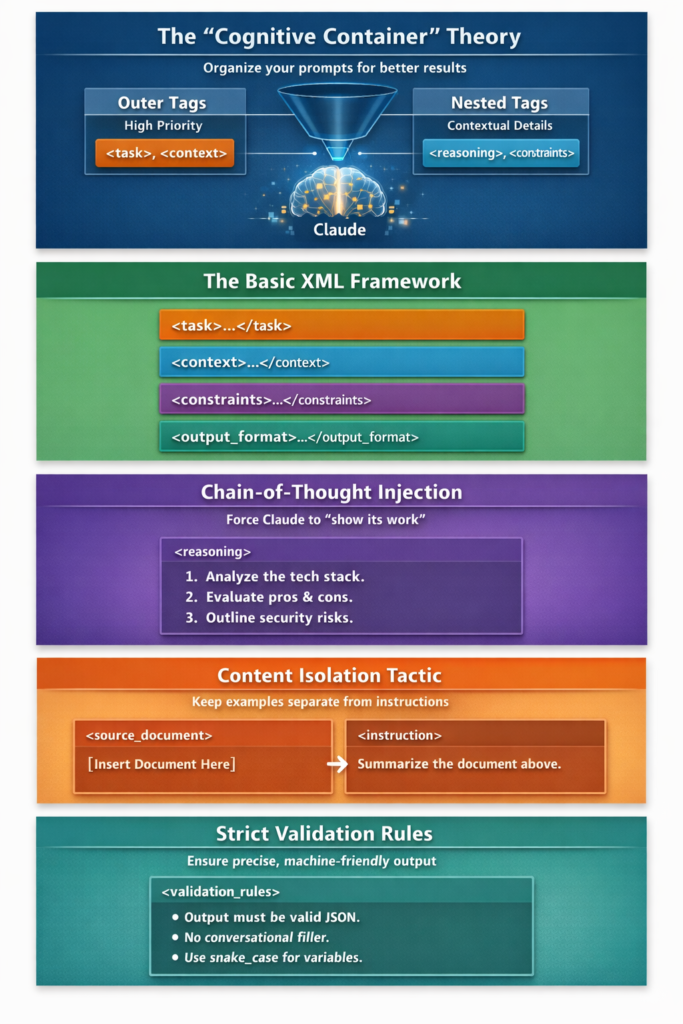
How Claude Parses XML:
Claude interprets XML tags as structured priority boundaries rather than simple formatting. Outer tags such as <task> and <context> establish high-level intent and global scope, while nested tags like <reasoning> and <constraints> provide execution-level details. This hierarchy helps Claude determine what instructions matter most, what information is contextual, and what rules must be enforced, resulting in more accurate reasoning, reduced instruction loss, and fewer hallucinations.
How does the “Cognitive Container” theory work?
The cognitive container theory explains that Claude treats XML tags as hierarchical containers that define priority and scope.
- Outer tags represent high-level intent and global instructions
- Nested tags represent contextual or execution-level details
This is comparable to the difference between telling a junior developer “make the code better” versus handing them a refactoring guide with linting rules, acceptance criteria, and output expectations.
Structured prompts reduce instruction loss and improve consistency across responses.
What is the basic XML prompt structure for Claude?
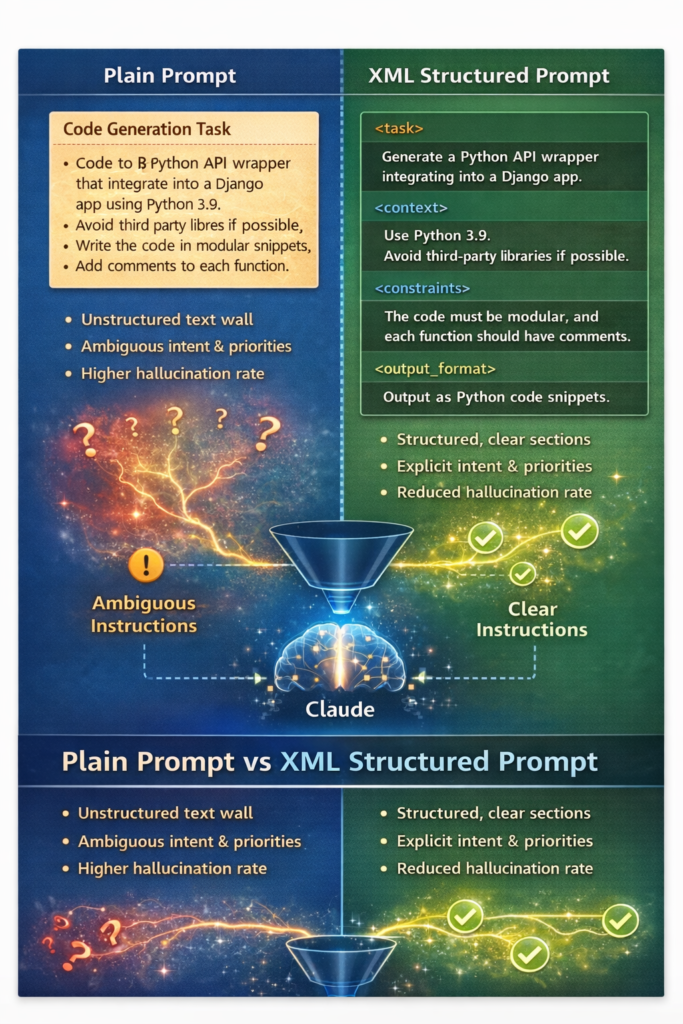
Plain Prompt vs XML Prompt:
Plain prompts rely on unstructured text, forcing Claude to infer intent, priority, and constraints, which often leads to instruction loss and hallucinations. XML-structured prompts remove this ambiguity by explicitly separating tasks, context, constraints, and output format, enabling Claude to process instructions with greater accuracy and consistency.
The most effective XML-structured prompts typically use four primary blocks:
<task>
    Describe exactly what the model should do.
</task>

<context>
    Provide background information or current state.
</context>

<constraints>
    Define rules such as word limits, tone, libraries, or exclusions.
</constraints>

<output_format>
    Specify the required output format (JSON, Markdown, schema).
</output_format>
This structure alone can produce a noticeable improvement in output quality compared to unstructured prompts.
How does XML prompting improve reasoning with Chain-of-Thought?
Chain-of-Thought (CoT) prompting encourages the model to reason step by step instead of jumping directly to an answer.
With XML, you can explicitly request this reasoning process:
<reasoning>
    Think through this step-by-step:
    1. Analyze the current technology stack.
    2. Evaluate trade-offs and risks.
    3. Consider security implications.
</reasoning>
By isolating reasoning from the final answer, you reduce hallucinations and improve logical consistency. This approach is especially useful for architectural decisions, migrations, and complex evaluations.
How does content isolation reduce hallucinations in Claude?
Content isolation prevents the model from confusing reference material with instructions.
When large documents are embedded directly into prompts, models may unintentionally treat examples as instructions. XML solves this by clearly separating source material:
<source_document>
    [Paste long documentation or research here]
</source_document>

<instruction>
    Summarize the document above without using outside knowledge.
</instruction>
This explicit boundary significantly reduces hallucinations because the model understands that everything inside the source document is reference-only.
How can XML validation rules enforce strict outputs?
For production use cases—such as APIs, code generation, or structured data—you often need outputs that are machine-readable.
Validation tags allow you to define strict rules:
<validation_rules>
    - Output must be valid JSON
    - Use snake_case for variables
    - Do not include explanatory text
</validation_rules>
This acts like a unit test for the model’s output, improving reliability for automated workflows.
What are real-world use cases of XML-structured prompting?
Automated Code Generation for SaaS Products
XML-structured prompting is ideal for generating API wrappers or backend components that must follow strict rules.
By separating the task, context, constraints, and output format, you ensure the generated code is modular, compliant, and immediately usable.
Benefits:
- Reduced irrelevant code
- Better adherence to architectural standards
- Consistent output structure
Document Summarization for Legal Research
Legal and compliance workflows benefit from XML prompting because accuracy and focus are critical.
By explicitly defining constraints and isolating source documents, Claude produces summaries that prioritize relevant clauses and avoid omissions.
Benefits:
- Focused summaries
- Reduced hallucinations
- Predictable formatting
Best Practices for XML-Structured Prompting
- Always separate task, context, and constraints
- Use content isolation for large reference material
- Enforce output formats and validation rules
- Use chain-of-thought only when reasoning is required
- Keep tag names consistent and meaningful
Common Mistakes to Avoid
- Mixing instructions and reference material
- Using XML tags without clear instructions
- Over-nesting tags unnecessarily
- Leaving constraints implicit or vague
Frequently Asked Questions about XML-Structured Prompting
What is XML-structured prompting for Claude?
It is a prompting technique that uses XML tags to structure instructions, context, constraints, and outputs for improved clarity and accuracy.
Is XML prompting better than natural language prompting?
For simple tasks, natural language works fine. For complex or high-stakes tasks, XML prompting is more reliable.
Does XML-structured prompting reduce hallucinations?
Yes. Clear boundaries and content isolation significantly reduce hallucinations.
When should developers use XML-structured prompts?
When generating code, summarizing large documents, enforcing strict formats, or handling multi-step reasoning.
Final Takeaway
XML-structured prompting improves Claude’s performance by replacing ambiguity with structure.
By treating prompts like well-defined interfaces instead of conversations, developers can unlock more accurate, predictable, and scalable AI outputs.
Comments