
Most RAG tutorials end at “paste these 10 lines and you’re done.” Then you try it on real data and everything breaks.
This isn’t that kind of tutorial.
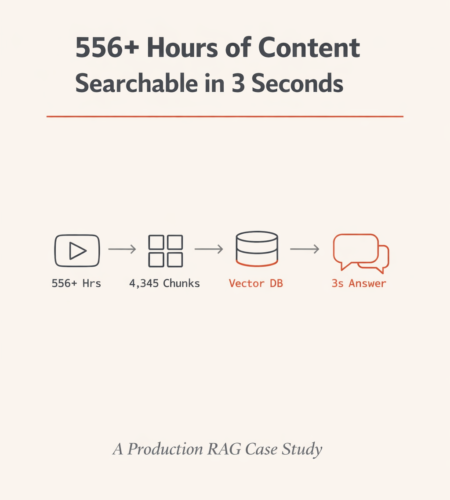
I built a production RAG system that processes 556+ hours of podcast content — 1,604,933 words across 109 videos — into a searchable AI knowledge base. The system answers questions in 3-6 seconds with source citations, and reduced projected API costs from ~$45,000/month to ~$4,500/month.
This post is the full technical breakdown. Every architecture decision, every code snippet, every lesson learned. By the end, you’ll have everything you need to build your own RAG system in Python using ChromaDB, Sentence Transformers, and any LLM API.
What You’ll Build
A complete RAG pipeline that takes unstructured audio/video content and turns it into a searchable knowledge base with these capabilities:
- Semantic search across all content (not keyword matching)
- Multilingual support (Hindi, English, and Hinglish in this case)
- Speaker attribution (who said what)
- Source citation with episode links and timestamps
- Streaming responses (word-by-word, like ChatGPT)
- Three-layer hallucination prevention
- Sub-$0.01 cost per query
Final metrics:
| Metric | Value |
|---|---|
| Content processed | 556+ hours (109 videos) |
| Words indexed | 1,604,933 |
| Searchable chunks | 4,345 |
| Avg words per chunk | 369 |
| Embedding dimensions | 384 |
| Vector search time | 0.1–0.2 seconds |
| Total response time | 3–6 seconds |
| API cost (naive) | ~$45,000/month |
| API cost (RAG) | ~$4,500/month |
| Cost reduction | 90% |
| Database storage | ~50MB |
Prerequisites and Setup
Python version: 3.10+
Create your project:
mkdir podcast-rag && cd podcast-rag
python -m venv venv
source venv/bin/activate  # Windows: venv\Scripts\activate
Install dependencies:
pip install streamlit chromadb sentence-transformers requests python-dotenvrequirements.txt:
streamlit==1.38.0
chromadb==0.5.0
sentence-transformers==3.0.1
requests==2.32.3
python-dotenv==1.0.1
Environment variables (.env):
PERPLEXITY_API_KEY=your-key-here
CHROMA_DB_PATH=./chroma_db
Project structure:
podcast-rag/
├── .env
├── requirements.txt
├── transcripts/                    # Raw transcription JSON files
│   ├── video_abc123.json
│   └── video_def456.json
├── chunks/
│   └── chunks.json                 # Processed chunks with metadata
├── chroma_db/                      # ChromaDB persistent storage
│   ├── chroma.sqlite3
│   └── [uuid]/                     # Vector indices (HNSW)
├── scripts/
│   ├── chunk_transcripts.py        # Step 1: Chunking pipeline
│   ├── build_vector_db.py          # Step 2: Embedding + storage
│   └── app.py                      # Step 3: Streamlit application
└── config.py                       # Centralized configuration
Why the Naive Approach Fails (The Math That Kills Most Projects)
Before building anything, let’s understand why you can’t just “send everything to ChatGPT.”
The content library: 1,604,933 words. That’s roughly 2 million tokens.
Problem 1: Context window limits. Even GPT-4 Turbo’s 128K token window fits about 96,000 words. This content is 16x larger. It physically doesn’t fit in a single prompt.
Problem 2: Cost at scale. If you somehow split it across multiple calls:
| Approach | Words sent per query | Cost per query | Monthly cost (10K queries) |
|---|---|---|---|
| Full context (naive) | 1,604,933 | ~$4.50 | ~$45,000 |
| RAG (top 5 chunks) | ~1,850 | ~$0.005 | ~$4,500 |
| Difference | 866x fewer words | 900x cheaper | $40,500 saved |
RAG doesn’t just reduce costs. It makes the system possible.
The RAG Architecture: Two Pipelines
Every RAG system has two distinct pipelines. Understanding this separation is essential before writing any code.
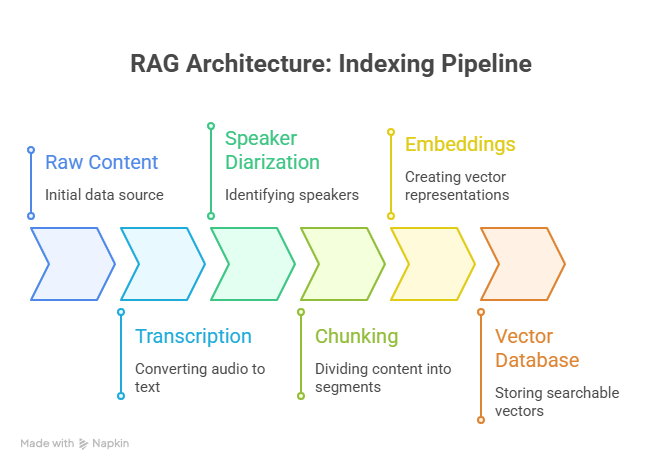
Pipeline 1 — Indexing (runs once, or when new content is added):
Raw Content → Transcription → Speaker Diarization → Chunking → Embeddings → Vector DatabaseThis is your data preparation pipeline. It transforms raw audio/video into searchable vectors. You run it once, then again only when new episodes are published.
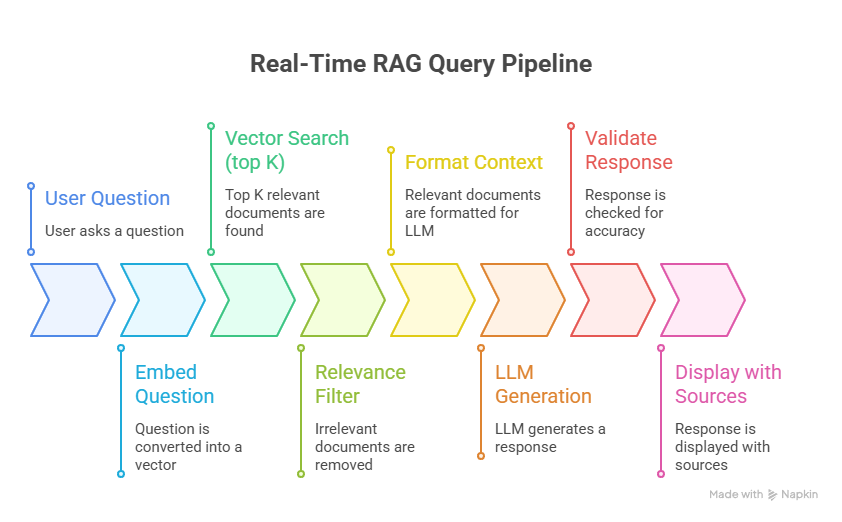
Pipeline 2 — Query (runs on every user question, real-time):
User Question → Embed Question → Vector Search (top K) → Relevance Filter → Format Context → LLM Generation → Validate Response → Display with SourcesThis is your real-time pipeline. It needs to complete in under 6 seconds.
Let me break down every step with production-ready code.
Step 1: Transcription with Speaker Diarization
For podcast or interview content, plain transcription loses critical information. You need speaker diarization — separating who said what.
Why this matters for RAG quality:
- A host asking “What’s your advice on investing?” followed by a guest’s detailed answer is ONE coherent thought. Without diarization, your chunks can’t preserve this relationship.
- Attribution enables the system to say “Guest Dr. Hiranandani recommended X” instead of “someone mentioned X.”
- Different speakers have different authority. A financial guest’s investing advice is more credible than the host’s paraphrasing.
Expected transcript format (JSON):
json
{
  "video_id": "abc123",
  "title": "Interview with Dr. Hiranandani on Real Estate",
  "date": "2024-03-15",
  "guest": "Dr. Hiranandani",
  "duration_minutes": 65,
  "segments": [
    {
      "speaker": "Host",
      "start_time": 0.0,
      "end_time": 45.2,
      "text": "Welcome to the show. Today we're talking about real estate investing in 2024."
    },
    {
      "speaker": "Dr. Hiranandani",
      "start_time": 45.5,
      "end_time": 120.8,
      "text": "Thank you for having me. The market right now is interesting because..."
    }
  ]
}
You can generate these using services like AssemblyAI (which includes diarization), Whisper + PyAnnote, or any transcription API that supports speaker labels.
Step 2: Chunking Strategy — The Decision That Makes or Breaks Your RAG
I’ll say it plainly: chunking determines 80% of your RAG system’s answer quality. Not the LLM you choose. Not the embedding model. Not the prompt. Chunking.
Why fixed-size chunking fails for conversational content
Most RAG tutorials tell you to split every 500 tokens. Here’s what happens when you do that with podcast transcripts:
CHUNK 1 (tokens 1-500):
"...and that's why I believe real estate is the safest asset class. [HOST]: That's
interesting. Now switching topics, what about—"

CHUNK 2 (tokens 501-1000):
"—cryptocurrency? Do you think Bitcoin has a future? [GUEST]: Absolutely. The blockchain
technology underlying crypto is revolutionary because..."
Chunk 1 contains the tail of a real estate answer mashed with the start of a crypto question. Chunk 2 has the crypto question mashed with the beginning of the answer. Neither chunk is useful standalone. The LLM gets confused context and produces a confused answer.
Utterance-based chunking: how to do it right
Split at speaker turns — the natural boundaries in conversation.
config.py:
python
# Chunking configuration
TARGET_CHUNK_SIZE = 300      # target words per chunk
MAX_CHUNK_SIZE = 500         # hard cap
MIN_CHUNK_SIZE = 100         # minimum viable chunk
OVERLAP_SIZE = 50            # words of overlap between chunks
SPLIT_BOUNDARY = "speaker_turn"
scripts/chunk_transcripts.py:
python
import json
import os
from pathlib import Path
from dataclasses import dataclass, asdict
from typing import List

@dataclass
class Chunk:
    chunk_id: str
    video_id: str
    text: str
    start_time: float
    end_time: float
    speaker: str
    episode_title: str
    episode_date: str
    guest_name: str
    chunk_index: int
    word_count: int
    youtube_link: str

def load_transcript(filepath: str) -> dict:
    """Load a single transcript JSON file."""
    with open(filepath, 'r', encoding='utf-8') as f:
        return json.load(f)

def create_chunks_from_transcript(
    transcript: dict,
    target_size: int = 300,
    overlap: int = 50,
    min_size: int = 100
) -> List[Chunk]:
    """
    Create utterance-based chunks from a transcript.

    Strategy:
    1. Group consecutive segments by speaker turn
    2. Accumulate text until target_size is reached
    3. Split at the nearest speaker boundary
    4. Add overlap from previous chunk for context continuity
    """
    segments = transcript['segments']
    video_id = transcript['video_id']
    chunks = []

    current_text = ""
    current_start = segments[0]['start_time']
    current_speaker = segments[0]['speaker']
    overlap_text = ""

    for i, segment in enumerate(segments):
        # Add segment text
        current_text += f"[{segment['speaker']}]: {segment['text']} "
        word_count = len(current_text.split())

        # Check if we've reached target size AND we're at a speaker boundary
        next_is_different_speaker = (
            i + 1 < len(segments) and
            segments[i + 1]['speaker'] != segment['speaker']
        )
        is_last_segment = (i == len(segments) - 1)

        if (word_count >= target_size and next_is_different_speaker) or is_last_segment:
            # Don't create tiny fragments
            if word_count >= min_size:
                full_text = overlap_text + current_text if overlap_text else current_text

                chunk = Chunk(
                    chunk_id=f"{video_id}_chunk_{len(chunks)}",
                    video_id=video_id,
                    text=full_text.strip(),
                    start_time=current_start,
                    end_time=segment['end_time'],
                    speaker=current_speaker,
                    episode_title=transcript['title'],
                    episode_date=transcript['date'],
                    guest_name=transcript.get('guest', 'Unknown'),
                    chunk_index=len(chunks),
                    word_count=len(full_text.split()),
                    youtube_link=f"https://youtube.com/watch?v={video_id}&t={int(current_start)}"
                )
                chunks.append(chunk)

                # Save last N words as overlap for next chunk
                words = current_text.split()
                overlap_text = " ".join(words[-overlap:]) + " " if len(words) > overlap else ""

                # Reset for next chunk
                current_text = ""
                if not is_last_segment:
                    current_start = segments[i + 1]['start_time']
                    current_speaker = segments[i + 1]['speaker']

    return chunks

def process_all_transcripts(transcript_dir: str, output_path: str):
    """Process all transcript files and save chunks."""
    all_chunks = []
    transcript_files = list(Path(transcript_dir).glob("*.json"))

    print(f"Processing {len(transcript_files)} transcripts...")

    for filepath in transcript_files:
        transcript = load_transcript(str(filepath))
        chunks = create_chunks_from_transcript(transcript)
        all_chunks.extend(chunks)
        print(f"  {filepath.name}: {len(chunks)} chunks")

    # Save all chunks
    with open(output_path, 'w', encoding='utf-8') as f:
        json.dump([asdict(c) for c in all_chunks], f, indent=2, ensure_ascii=False)

    total_words = sum(c.word_count for c in all_chunks)
    print(f"\nTotal: {len(all_chunks)} chunks, {total_words:,} words")
    print(f"Average: {total_words // len(all_chunks)} words per chunk")

    return all_chunks

if __name__ == "__main__":
    chunks = process_all_transcripts("./transcripts", "./chunks/chunks.json")
Result from production run: 4,345 chunks from 109 videos, averaging 369 words per chunk. Every chunk is a coherent conversational segment that makes sense when read in isolation.
Step 3: Embeddings — Converting Text to Searchable Vectors
Embeddings are what make semantic search possible. They convert text into numerical vectors where similar meanings produce similar vectors — regardless of the specific words used.
Why this matters: semantic search vs keyword search
| User query | Keyword search finds | Semantic search finds |
|---|---|---|
| “how to invest in property” | Only content with those exact words | “real estate tips,” “buying houses,” “building wealth through land” |
| “fundraising” | Only “fundraising” | “raising capital,” “investor pitch,” “funding rounds” |
| “paisa kaise kamaye” (Hindi: how to earn money) | Nothing (wrong language) | English content about earning money, income strategies |
| “buisness advice” (typo) | Nothing | “business advice,” “entrepreneurship tips” |
Model selection: why Multilingual MiniLM
python
from sentence_transformers import SentenceTransformer

model = SentenceTransformer('paraphrase-multilingual-MiniLM-L12-v2')| Factor | paraphrase-multilingual-MiniLM-L12-v2 | OpenAI text-embedding-3-small | Cohere embed-v3 |
|---|---|---|---|
| Dimensions | 384 | 1536 | 1024 |
| Multilingual | 50+ languages including Hindi | Good but English-optimized | Good |
| Cost | $0 (runs locally) | $0.02/1M tokens | $0.10/1M tokens |
| Speed | ~10ms per encoding | Network latency + ~50ms | Network latency + ~50ms |
| Size | ~80MB | API-dependent | API-dependent |
| Privacy | Content stays local | Sent to OpenAI servers | Sent to Cohere servers |
| GPU required | No | N/A | N/A |
For this project, local inference was the clear winner. Zero cost per embedding, no network dependency, and the content (which belongs to the podcast creator) never leaves the server. The multilingual support is critical because the podcast switches between Hindi and English mid-sentence.
Step 4: Vector Database — ChromaDB Setup and Storage
scripts/build_vector_db.py:
python
import json
import chromadb
from chromadb.utils import embedding_functions
from dotenv import load_dotenv
import os

load_dotenv()

# Configuration
CHROMA_DB_PATH = os.getenv("CHROMA_DB_PATH", "./chroma_db")
COLLECTION_NAME = "podcast_brain"
EMBEDDING_MODEL = "paraphrase-multilingual-MiniLM-L12-v2"
BATCH_SIZE = 100  # ChromaDB performs better with batched inserts

def build_database(chunks_path: str):
    """Build the ChromaDB vector database from processed chunks."""

    # Load chunks
    with open(chunks_path, 'r', encoding='utf-8') as f:
        chunks = json.load(f)

    print(f"Loaded {len(chunks)} chunks")

    # Initialize ChromaDB with persistent storage
    client = chromadb.PersistentClient(path=CHROMA_DB_PATH)

    # Set up embedding function (auto-embeds on add and query)
    embedding_func = embedding_functions.SentenceTransformerEmbeddingFunction(
        model_name=EMBEDDING_MODEL
    )

    # Create or get collection
    # HNSW with cosine similarity — industry standard for text search
    collection = client.get_or_create_collection(
        name=COLLECTION_NAME,
        embedding_function=embedding_func,
        metadata={"hnsw:space": "cosine"}  # cosine similarity
    )

    # Batch insert for performance
    for i in range(0, len(chunks), BATCH_SIZE):
        batch = chunks[i:i + BATCH_SIZE]

        collection.add(
            ids=[c['chunk_id'] for c in batch],
            documents=[c['text'] for c in batch],
            metadatas=[{
                "video_id": c['video_id'],
                "episode_title": c['episode_title'],
                "episode_date": c['episode_date'],
                "guest_name": c['guest_name'],
                "speaker": c['speaker'],
                "start_time": c['start_time'],
                "end_time": c['end_time'],
                "youtube_link": c['youtube_link'],
                "word_count": c['word_count']
            } for c in batch]
            # Note: embeddings are auto-generated by embedding_func
        )

        print(f"  Indexed {min(i + BATCH_SIZE, len(chunks))}/{len(chunks)} chunks")

    # Verify
    print(f"\nDatabase built: {collection.count()} vectors stored")
    print(f"Storage location: {CHROMA_DB_PATH}")
    print(f"Index type: HNSW (cosine similarity)")
    print(f"Embedding dimensions: 384")

if __name__ == "__main__":
    build_database("./chunks/chunks.json")
How HNSW search works (and why it’s fast)
ChromaDB uses HNSW (Hierarchical Navigable Small World) for approximate nearest neighbor search.
Brute force: Compare the query vector against every single one of the 4,345 stored vectors. Time complexity: O(n). Slow.
HNSW: Build a multi-layer graph where similar vectors are connected. Start at the top layer (sparse, few nodes), navigate down through increasingly dense layers to find the nearest neighbors. Time complexity: O(log n). Fast.
The practical difference: search completes in 0.1-0.2 seconds instead of several seconds.
Querying the database
results = collection.query(
    query_texts=["How to invest in real estate?"],
    n_results=5,
    include=["documents", "metadatas", "distances"]
)

# Results structure:
# {
#     'ids': [['chunk_45', 'chunk_123', 'chunk_89', ...]],
#     'documents': [['Dr. Hiranandani says...', 'Ajitesh recommends...', ...]],
#     'metadatas': [[
#         {'episode_title': '...', 'youtube_link': '...', 'guest_name': '...'},
#         ...
#     ]],
#     'distances': [[0.45, 0.52, 0.61, ...]]  # lower = more similar
# }
Understanding distances:
Distance = 1 - Cosine_Similarity

0.0  = Perfect match (similarity 1.0)
0.5  = Moderately related
1.0  = Unrelated (similarity 0.0)  ← our threshold
2.0  = Opposite meaning
Total database size: ~50MB. The entire searchable knowledge of 556+ hours of content in a file smaller than most mobile apps. No cloud infrastructure. No monthly database bills.
Why ChromaDB (and when to use alternatives)
| Vector DB | Best for | Limitations |
|---|---|---|
| ChromaDB (this project) | Prototypes, small-medium scale (<100K vectors), local deployment | No built-in auth, single-machine only |
| Pinecone | Managed production, auto-scaling | Paid, cloud-only, vendor lock-in |
| Qdrant | Self-hosted production, filtering-heavy workloads | More complex setup |
| Weaviate | Multi-modal search (text + images) | Heavier infrastructure |
| FAISS | Pure speed, research | No persistence built-in, no metadata filtering |
For thousands of documents, ChromaDB is the right choice. If your dataset grows to millions of vectors or you need multi-tenant access, migrate to Qdrant or Pinecone — the embedding format is portable.
Step 5: LLM Integration — Perplexity API with Streaming
The retrieval pipeline finds the right chunks. The LLM turns them into a coherent answer.
Why Perplexity over OpenAI or Anthropic
| Factor | Perplexity (sonar) | OpenAI (GPT-4o-mini) | Anthropic (Claude Haiku) |
|---|---|---|---|
| Cost per 1M input tokens | ~$0.20 | ~$0.15 | ~$0.25 |
| Cost per 1M output tokens | ~$0.60 | ~$0.60 | ~$1.25 |
| Streaming | Native | Native | Native |
| Instruction following | Very good | Excellent | Excellent |
| Response speed | Fast | Fast | Fast |
For this use case — high-volume, cost-sensitive, factual Q&A where the context is provided — Perplexity’s economics work well. The LLM doesn’t need to be creative. It needs to read the context and answer accurately.
Important: You can swap this for any LLM API. The RAG architecture is LLM-agnostic. OpenAI, Anthropic, Groq, Ollama (local) — the retrieval pipeline stays identical.
Implementation with streaming
import requests
import json
from dotenv import load_dotenv
import os

load_dotenv()

PERPLEXITY_API_URL = "https://api.perplexity.ai/chat/completions"
PERPLEXITY_API_KEY = os.getenv("PERPLEXITY_API_KEY")
PERPLEXITY_MODEL = "sonar"

def generate_answer(question: str, context_chunks: list, metadatas: list) -> str:
    """
    Send context + question to LLM and get a streamed answer.

    Args:
        question: User's question
        context_chunks: List of relevant text chunks from ChromaDB
        metadatas: Corresponding metadata for source citation

    Returns:
        Complete answer string
    """

    # Format context with source labels
    formatted_context = ""
    for i, (chunk, meta) in enumerate(zip(context_chunks, metadatas)):
        formatted_context += (
            f"[Source {i+1}: {meta['episode_title']} | "
            f"Guest: {meta['guest_name']} | "
            f"Link: {meta['youtube_link']}]\n"
            f"{chunk}\n\n"
        )

    system_prompt = """You are an AI assistant that answers questions
    about podcast content. You must follow these rules strictly:

    1. ONLY answer using the provided context below
    2. If the answer is not in the context, say "I don't have information about that in the available content"
    3. Always cite which source (episode) the information comes from
    4. Never fabricate quotes or attribute statements to the wrong person
    5. If multiple sources discuss the topic, synthesize but cite all
    6. Keep answers concise and direct
    """

    user_prompt = f"""Context from podcast episodes:

    {formatted_context}

    Question: {question}

    Answer based ONLY on the context above:"""

    response = requests.post(
        PERPLEXITY_API_URL,
        headers={
            "Authorization": f"Bearer {PERPLEXITY_API_KEY}",
            "Content-Type": "application/json"
        },
        json={
            "model": PERPLEXITY_MODEL,
            "messages": [
                {"role": "system", "content": system_prompt},
                {"role": "user", "content": user_prompt}
            ],
            "temperature": 0.1,   # Low = factual, deterministic
            "max_tokens": 500,    # Enough for detailed answers
            "stream": True        # Word-by-word delivery
        },
        stream=True
    )

    full_answer = ""
    for line in response.iter_lines():
        if line:
            line = line.decode('utf-8')
            if line.startswith('data: '):
                try:
                    chunk = json.loads(line[6:])
                    content = chunk['choices'][0]['delta'].get('content', '')
                    if content:
                        full_answer += content
                except (json.JSONDecodeError, KeyError):
                    continue

    return full_answer
The temperature: 0.1 decision: For RAG, you want the LLM to extract and summarize from context — not generate creative content. Low temperature produces deterministic, factual outputs. If you’re building a creative writing tool, use 0.7+. For factual Q&A over your own data, 0.0–0.2 is the sweet spot.
Step 6: Hallucination Prevention — The Three-Layer System
This is what separates a demo from a production system. Without these guardrails, your system will confidently fabricate answers that sound plausible but are completely wrong.
Layer 1: Retrieval filtering (pre-LLM)
Filter out chunks that aren’t similar enough to the question. If the vector database returns results with high distance scores, they’re irrelevant noise.
RELEVANCE_THRESHOLD = 1.0  # cosine distance cutoff

def filter_relevant_chunks(results: dict) -> tuple:
    """
    Filter chunks by relevance. Returns only chunks with
    distance < threshold (lower distance = more similar).
    """
    documents = results['documents'][0]
    metadatas = results['metadatas'][0]
    distances = results['distances'][0]

    filtered_docs = []
    filtered_meta = []

    for doc, meta, dist in zip(documents, metadatas, distances):
        if dist < RELEVANCE_THRESHOLD:
            filtered_docs.append(doc)
            filtered_meta.append(meta)

    return filtered_docs, filtered_meta
Layer 2: Minimum context requirement (pre-LLM)
If the system can’t find at least 2 relevant chunks, it lacks sufficient context. Don’t force an answer.
MIN_RELEVANT_CHUNKS = 2

def has_sufficient_context(relevant_chunks: list) -> bool:
    """Check if we have enough context to give a reliable answer."""
    return len(relevant_chunks) >= MIN_RELEVANT_CHUNKS
Layer 3: Response validation (post-LLM)
After the LLM generates a response, check whether it actually answered or punted.
NO_ANSWER_INDICATORS = [
    "i don't have information",
    "i couldn't find",
    "not mentioned in",
    "no relevant content",
    "the context does not",
    "there is no information"
]

def is_valid_answer(response: str) -> bool:
    """
    Check if the LLM actually answered from context,
    or if it indicated the topic isn't covered.
    """
    response_lower = response.lower()
    return not any(phrase in response_lower for phrase in NO_ANSWER_INDICATORS)
Putting it together: the complete query function
def answer_question(question: str, collection) -> dict:
    """
    Complete query pipeline: search → filter → generate → validate.

    Returns:
        {
            "answer": str,
            "sources": list,
            "is_valid": bool,
            "chunks_found": int,
            "chunks_relevant": int
        }
    """
    # Step 1: Vector search
    results = collection.query(
        query_texts=[question],
        n_results=5,
        include=["documents", "metadatas", "distances"]
    )

    chunks_found = len(results['documents'][0])

    # Step 2: Relevance filter
    relevant_docs, relevant_meta = filter_relevant_chunks(results)
    chunks_relevant = len(relevant_docs)

    # Step 3: Minimum context check
    if not has_sufficient_context(relevant_docs):
        return {
            "answer": "I couldn't find enough relevant information to answer that question confidently.",
            "sources": [],
            "is_valid": False,
            "chunks_found": chunks_found,
            "chunks_relevant": chunks_relevant
        }

    # Step 4: LLM generation
    answer = generate_answer(question, relevant_docs, relevant_meta)

    # Step 5: Response validation
    valid = is_valid_answer(answer)

    # Step 6: Extract sources for citation
    sources = [
        {
            "episode": meta['episode_title'],
            "guest": meta['guest_name'],
            "link": meta['youtube_link']
        }
        for meta in relevant_meta
    ]

    return {
        "answer": answer if valid else "This topic doesn't appear to be covered in the available content.",
        "sources": sources if valid else [],
        "is_valid": valid,
        "chunks_found": chunks_found,
        "chunks_relevant": chunks_relevant
    }
See It in Action: Two Queries, Two Outcomes
Query Found: Answering from 100+ Hours in Seconds
Query Not Found: The System Says “I Don’t Know” Instead of Guessing
Step 7: Streamlit Frontend — The Complete Application
python
# scripts/app.py
import streamlit as st
import chromadb
from chromadb.utils import embedding_functions
from sentence_transformers import SentenceTransformer
from dotenv import load_dotenv
import os

load_dotenv()

# --- Configuration ---
CHROMA_DB_PATH = os.getenv("CHROMA_DB_PATH", "./chroma_db")
COLLECTION_NAME = "podcast_brain"
EMBEDDING_MODEL = "paraphrase-multilingual-MiniLM-L12-v2"

# --- Cache expensive operations (run ONCE, persist across reruns) ---
@st.cache_resource
def load_collection():
    """Load ChromaDB collection. Cached — only runs on first load."""
    client = chromadb.PersistentClient(path=CHROMA_DB_PATH)
    embedding_func = embedding_functions.SentenceTransformerEmbeddingFunction(
        model_name=EMBEDDING_MODEL
    )
    return client.get_collection(
        name=COLLECTION_NAME,
        embedding_function=embedding_func
    )

# --- Streamlit reruns the ENTIRE script on every interaction ---
# That's why caching matters. Without @st.cache_resource,
# ChromaDB would reload from disk on every button click.

st.set_page_config(page_title="Podcast Brain", page_icon="", layout="wide")
st.title(" Podcast Brain")
st.caption("Search 556+ hours of podcast content instantly")

# Load database
collection = load_collection()
st.sidebar.metric("Indexed Chunks", f"{collection.count():,}")

# --- Example queries (use callback pattern to avoid widget bug) ---
def set_query(text):
    st.session_state.user_query = text

example_queries = [
    "How to build a personal brand?",
    "What's the best investment strategy?",
    "Tips for morning routine and productivity"
]

st.sidebar.subheader("Try these:")
for eq in example_queries:
    st.sidebar.button(eq, on_click=set_query, args=(eq,), key=eq)

# --- Main search ---
if 'user_query' not in st.session_state:
    st.session_state.user_query = ""

query = st.text_input(
    "Ask anything about the podcast content:",
    value=st.session_state.user_query,
    placeholder="e.g., What did the guest say about real estate investing?"
)

if query:
    with st.status("Searching 556+ hours of content...", expanded=True) as status:
        # Run the complete pipeline
        result = answer_question(query, collection)
        status.update(label="Done!", state="complete")

    # Display answer
    if result['is_valid']:
        st.markdown(result['answer'])

        # Display sources
        if result['sources']:
            with st.expander(f"📎 Sources ({len(result['sources'])} episodes)"):
                for src in result['sources']:
                    st.markdown(
                        f"**{src['episode']}** (Guest: {src['guest']}) — "
                        f"[Watch clip]({src['link']})"
                    )
    else:
        st.warning(result['answer'])

    # Debug info
    with st.expander("Debug"):
        st.json({
            "chunks_found": result['chunks_found'],
            "chunks_relevant": result['chunks_relevant'],
            "is_valid": result['is_valid']
        })
Run it:
bash
streamlit run scripts/app.pyRunning the Complete Pipeline (Start to Finish)
bash
# Step 1: Process transcripts into chunks
python scripts/chunk_transcripts.py
# Output: ./chunks/chunks.json (4,345 chunks)

# Step 2: Build vector database
python scripts/build_vector_db.py
# Output: ./chroma_db/ (~50MB)

# Step 3: Launch the app
streamlit run scripts/app.py
# Open: http://localhost:8501
Steps 1 and 2 run once. Step 3 is your production application.
Performance Benchmarks
| Operation | Time | Notes |
|---|---|---|
| Full indexing (109 videos) | ~15 minutes | One-time cost |
| Embedding single query | ~10ms | Local inference, no API |
| Vector search (4,345 chunks) | 100-200ms | HNSW approximate search |
| LLM generation (streaming) | 2-5 seconds | Depends on answer length |
| Total query-to-answer | 3-6 seconds | End-to-end user experience |
What I’d Improve Next
No system is perfect. Here’s the honest roadmap.
Reranking. Add a cross-encoder reranker (like cross-encoder/ms-marco-MiniLM-L-6-v2) after vector search. The bi-encoder embedding model is fast but approximate. A cross-encoder compares query-chunk pairs more deeply, reordering results for better relevance. Adds ~200ms latency but meaningfully improves answer quality on ambiguous queries.
Hybrid search. Combine BM25 keyword search with vector search using Reciprocal Rank Fusion. Some queries are better served by exact keyword matching (a specific guest name, an episode number) while others need semantic understanding. Hybrid retrieval can improve recall by 1-9% according to recent benchmarks.
Query expansion. Use the LLM to expand short queries with synonyms before searching. “Fundraising” becomes “fundraising OR raising capital OR investor pitch OR funding rounds.” This widens the retrieval net for terse queries.
Semantic caching. Cache frequent query-answer pairs. If the same question (or a semantically similar one) is asked again, serve the cached response instantly. Can reduce LLM costs by up to 68% in typical production workloads.
Multi-turn conversation. Currently, each question is independent. Adding conversation memory would let users ask follow-ups like “tell me more about that” or “what else did the guest say on this topic?”
Evaluation with RAGAS. Implement systematic evaluation using the RAGAS framework to measure faithfulness, answer relevancy, context precision, and context recall. Without metrics, you’re guessing about quality.
Lessons Learned from Production
1. Chunking is 80% of the work. I spent the majority of development time on the chunking strategy — not model selection, not prompt engineering, not the UI. How you break your content into pieces determines the ceiling for answer quality. Bad chunks produce bad answers regardless of everything else. If you take one thing from this post: invest your time in chunking.
2. Semantic search beats keyword search for conversational content. People ask questions using concepts, not exact phrases. “How do I grow my business?” should match content about “scaling a startup” even though zero words overlap. Embeddings make this kind of matching possible. For structured data (dates, names, codes), keyword search is still better — which is why hybrid search is the ideal end state.
3. Your system prompt is a legal contract with the LLM. Every rule in the system prompt exists because I caught the system doing something wrong during testing. “Never fabricate quotes” exists because it fabricated quotes. “Always cite sources” exists because it stopped citing. The rules are battle-tested, not theoretical.
4. Cost optimization is a feature, not an afterthought. A system that costs $45K/month isn’t a solution — it’s a liability. The entire RAG architecture exists because economics matter. The technical question was never “can an LLM answer questions about podcasts?” It was always “can it do so at a cost that makes business sense?”
5. Local embeddings save more than money. Running Multilingual MiniLM locally means zero embedding costs, no network latency, no API rate limits, and the content never leaves your server. For private or sensitive content, this isn’t optional — it’s a requirement.
FAQ
Can I use this approach for content other than podcasts? Yes. The architecture works for any unstructured text: meeting recordings, lecture series, interview archives, customer support call transcripts, audiobook libraries. The chunking strategy needs to be adapted to the content type — utterance-based for conversations, paragraph-based for articles, section-based for documentation.
What if my content is in a single language (English only)? Use all-MiniLM-L6-v2 instead of the multilingual variant. It’s faster and produces slightly better results for English-only content.
How do I add new episodes without rebuilding the entire database? ChromaDB supports incremental adds. Process the new transcript, chunk it, and call collection.add() with only the new chunks. The HNSW index updates automatically.
Can I replace Perplexity with a local LLM? Absolutely. Use Ollama with Llama 3, Mistral, or Qwen. Replace the Perplexity API call with a local HTTP request to http://localhost:11434/api/chat. The RAG pipeline stays identical — only the generation endpoint changes.
What’s the maximum content size ChromaDB can handle? ChromaDB works well up to ~100K-500K vectors on a single machine. Beyond that, consider Qdrant (self-hosted) or Pinecone (managed). The embeddings are portable — you can migrate without re-processing your content.
How do I evaluate if my RAG system is actually working well? Use the RAGAS framework. Create a test set of 50-100 questions with known answers from your content. Measure faithfulness (does the answer match the retrieved context?), answer relevancy (does it actually address the question?), and context precision (are the retrieved chunks the right ones?).
Want Something Like This Built for Your Content?
If you’re a content creator, podcaster, or media company sitting on hundreds of hours of content that nobody can search — I build these systems.
Your content library is an asset. Right now it’s a dormant one.
Comments