
I’ve been writing code for over 8 years. Laravel, PHP, Flask, Node.js, Python, MySQL — the full stack. I’ve built healthcare recruitment platforms, warehouse management systems, e-commerce portals, and job boards for clients across India, USA, and Portugal.
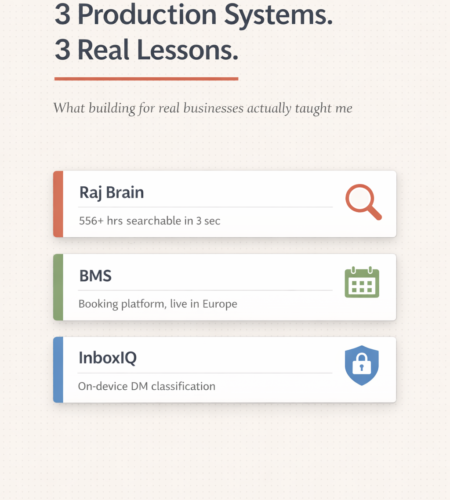
But in the last year, three projects changed how I think about building software.
Not because the tech was new. But because the problems were real, the users were real, and the consequences of getting it wrong were real.
Here’s what actually happened.
1. Raj Brain: Making 556 Hours of Podcast Content Searchable in 3 Seconds
How it started
A content creator — Raj Shamani, one of India’s biggest podcasters with 577M+ views — had a problem I didn’t fully appreciate until I dug in.
109 podcast episodes. 556+ hours of recorded conversations. 1.6 million words spread across Hindi, English, and Hinglish (sometimes switching languages mid-sentence in the same episode). All of that knowledge was trapped in YouTube videos with no way to search through it.
Someone asks, “What did Raj say about building a personal brand in that episode with Dr. Hiranandani?” Good luck scrubbing through 5-hour episodes to find it.
What I actually built
A RAG (Retrieval-Augmented Generation) system. The concept sounds straightforward — take content, make it searchable using AI. The execution was anything but.
Here’s the stack:
- Python for the entire backend
- ChromaDB with HNSW indexing as the vector database
paraphrase-multilingual-MiniLM-L12-v2for embeddings (384 dimensions)- Perplexity API (Sonar model) for the generation layer
- Streamlit for the user-facing search interface
The system processes all 109 episodes into 4,345 searchable chunks, embeds them as vectors, and returns sourced answers in under 3 seconds.
Where I got it wrong first
My first chunking approach was fixed-size — split every 800 words, move on. Standard stuff. It produced 2,100 chunks that looked clean in a spreadsheet.
But the search results were terrible.
A chunk would start in the middle of a guest’s answer and end in the middle of Raj’s follow-up question. The embedding captured half a thought. When a user searched for “advice on real estate investing,” the system would return fragments that technically contained the right words but missed the actual insight.
The fix was utterance-based chunking — splitting on speaker turns, not arbitrary word counts. Target chunk size dropped to around 300 words with 50-word overlap. The chunk count went up to 4,345, but each chunk now contained a complete thought from a single speaker.
The result:
| Metric | Fixed-Size (v1) | Utterance-Based (v2) |
|---|---|---|
| Chunks | 2,100 | 4,345 |
| Avg chunk size | 800 words | ~300 words |
| Hindi query accuracy | ~40% relevant | ~85% relevant |
| Hinglish query accuracy | ~25% relevant | ~80% relevant |
| Full response time | 12-18 seconds | 3-4 seconds |
Those accuracy numbers came from me manually testing 50 queries per language and rating the results. Not a fancy eval framework — just sitting with a native Hindi speaker and checking if the answers actually made sense.
The multilingual problem nobody warns you about
Most RAG tutorials assume English-only data. Raj’s podcast doesn’t work that way. A single paragraph in the transcript might switch from Hindi to English and back to Hinglish — sometimes within the same sentence.
Standard English embedding models (like OpenAI’s text-embedding-ada-002) collapsed on this. A question asked in Hindi would return English-only chunks, missing the most relevant Hindi segments entirely.
That’s why I went with paraphrase-multilingual-MiniLM-L12-v2. It’s not the biggest model — only 80MB, 384 dimensions, runs locally without a GPU. But it handles Hindi-English code-switching because it was trained on multilingual data. Embedding generation costs $0 because it runs on the server. No API calls, no per-token billing, and the podcast content (which belongs to the creator) never leaves the machine.
The cost lesson
The initial architecture using external API calls for embeddings would have projected costs of around $45K/month at scale. By switching to local embeddings (zero cost per query), using Perplexity’s Sonar model instead of GPT-4 (~$0.20/1M tokens vs $10+/1M tokens), and optimizing chunk sizes so the generation layer processes less text per query — production costs dropped by over 90%.
The entire ChromaDB database for 4,345 chunks takes about 50MB of storage. Vector search latency is 100-200ms. That’s the HNSW index doing its job.
The lesson: AI doesn’t work without engineering. I spent more time on chunking strategy and embedding model selection than on any other part of the system. The model is the easy part. The data pipeline underneath is where production systems succeed or fail.
2. BMS: An All-in-One Booking & Management System for Service Businesses
How it started
A laptop repair and software installation service operating across multiple European countries reached out with a problem that sounded simple but wasn’t.
They had customers booking repair appointments through phone calls and emails. Technicians were being dispatched manually — someone in the back office would check who’s available, call the technician, confirm the time, and then call the customer back. Service history lived in spreadsheets. Payments were tracked separately. And when a customer called to ask about the status of their laptop, the person answering had to dig through three different systems to give them an answer.
They didn’t need a fancy AI tool. They needed one system that connected everything — bookings, team scheduling, customer records, and payments — in one place.
What I built
BMS — a booking and business management platform designed for service businesses. Think of it as the system that runs operations so the business owner doesn’t have to micromanage every appointment, every technician, and every follow-up manually.
The core modules that are live right now:
- Customer booking hub — customers see available time slots and book online. No phone tag. No “I’ll check and get back to you.” The booking page works on mobile, which matters because most customers are booking from their phone while staring at a broken laptop screen.
- Smart scheduling — when a booking comes in, the system matches it to the right technician based on availability, location, and service type. No more calling around asking who’s free on Thursday afternoon.
- CRM — every customer interaction, service history, device details, and payment record in one place. When a repeat customer calls, the team already knows what laptop they have, what was fixed last time, and whether there’s an open invoice.
- Team management — technicians see their schedule, job details, and customer notes directly. No group chats, no miscommunication about which address to go to.
- Payment tracking — integrated payment flow so invoices, payments, and outstanding balances are all visible from the admin dashboard. No separate spreadsheet for “who’s paid and who hasn’t.”
The system is deployed and in active use — still in beta with ongoing improvements and new requirements coming in from the client. That’s how real software works. You ship, you get feedback, you iterate.
What I learned building BMS
Building a product is fundamentally different from building a client project.
When you build for a specific client, the requirements are fixed. They tell you what they need, you build it, you deliver. With BMS, I’m building a platform that needs to work for any service business — a laptop repair shop in Europe today, but potentially a salon, a cleaning service, or a clinic tomorrow.
That changes every architectural decision:
- Multi-tenancy from day one. The database schema, the authentication layer, the billing logic — all of it needs to support multiple businesses on the same platform without them seeing each other’s data. Retrofitting multi-tenancy later is a nightmare I’ve seen other developers go through. I built it in from the start.
- Scheduling is deceptively complex. A booking system sounds straightforward until you deal with time zones across European countries, technicians with different working hours, services that take different durations, buffer time between appointments, and cancellation/rescheduling logic. I spent more time on the scheduling engine than on any other feature.
- The gap between “working” and “production-ready” is massive. The first version of BMS worked — you could book an appointment and it showed up on the dashboard. But it wasn’t production-ready until it handled edge cases: what happens when two customers book the same slot within milliseconds? What if a technician marks a job complete but the customer disputes it? What about partial payments? Every edge case is a week of work that nobody sees but everybody notices when it’s missing.
The client didn’t need AI. They needed solid software engineering — clean architecture, reliable scheduling logic, and a system their team could actually use without training.
The lesson: Most service businesses are running on duct tape — phone calls, spreadsheets, WhatsApp groups, and manual follow-ups. They don’t need machine learning. They need well-engineered software that connects their operations into one system. And building that “simple” system properly is harder than most developers think.
3. InboxIQ: Classifying Instagram DMs Without Selling Out User Privacy
The creator’s inbox problem
If you manage a social media account with any real following, you know the inbox. Hundreds of DMs daily. Fan messages. Spam bots. Random questions. And buried somewhere in there — actual brand deals worth thousands of dollars.
A creator I was talking to showed me their Instagram inbox. They had 3 unopened brand collaboration requests sitting between 47 fan messages and 12 spam accounts. One of those brand deals had been waiting 6 days. The brand had already moved on to another creator.
Existing solutions either required forwarding all messages to an external API (so every private DM goes to someone else’s server) or were basic keyword filters that flagged “collab” but missed “we’d love to work with you on a campaign.”
What I built
A Chrome extension that classifies Instagram DMs directly in the browser using a locally-running language model. The classification categories: Brand Deals, Collaborations, Questions, Fan Praise, Support Requests, Spam, and Other.
The architecture:
- Chrome Extension (Manifest V3) — content scripts scrape DM previews from the Instagram web DOM, inject colored classification badges next to each conversation
- FastAPI backend — handles the classification pipeline, runs on the user’s own machine or VPS
- Qwen 2.5 7B via Ollama — the actual classification model, running locally
- Zero external API calls — no message data leaves the user’s machine
When a creator opens their DM inbox, they see colored badges: red for brand deals, blue for collaborations, yellow for questions, gray for spam. The high-priority stuff jumps out immediately.
The privacy decision that made everything harder
The easy path was obvious: send DM text to the OpenAI API, get a JSON classification back, done. I’d have had a working prototype in an afternoon.
But that means every private message — from brands, from fans, from personal contacts — gets transmitted to an external server. For creators whose DMs are their business pipeline and also their personal inbox, that’s a non-starter.
Running Qwen 2.5 7B locally through Ollama was the harder path:
- First attempts with phi3:mini were a disaster. The model kept returning
"other"with 0.3 confidence for everything — including obvious brand deal messages like “We want to sponsor your next video. Our budget is $500.” It wasn’t parsing the JSON format correctly. I had to switch to Qwen 2.5 7B which handled the structured output format reliably. - Inference is slower. ~2.3 seconds per classification vs. sub-500ms with an API call. I implemented batch processing so the extension classifies all visible DMs in one pass instead of one at a time.
- Temperature tuning matters for classification. I run at 0.1 — low enough for consistent categorization but not 0.0 which makes it rigid. The prompt is specific: respond with only a JSON object, no markdown, no explanation.
- Not every machine handles 7B parameters. Some creators run older laptops. I had to think about fallback strategies for lower-spec hardware.
The classification prompt handles multilingual DMs too — “Bhai collab karein? Mere channel pe 50k subscribers hain” correctly classifies as a collaboration request, not spam.
The testing I actually did
I sat with the Swagger UI at http://localhost:8000/docs and manually tested dozens of messages across all categories:
- “Hey! We love your content and want to sponsor your next video. Our budget is $500.” → Brand Deal
- “Bhai bohot mast video thi! Keep it up” → Fan Praise
- “Make $5000 daily from home! Click this link now!!!” → Spam
- “Your course link is not working. I paid but can’t access it.” → Support Request
- “Bhai collab karein? Mere channel pe 50k subscribers hain” → Collaboration
When it worked, it felt like magic. When it didn’t — when the first model returned garbage for every message — it felt like a week wasted. That’s the real experience of building with AI: the demo works in 10 minutes, production takes weeks.
The lesson: Privacy isn’t a feature you bolt on. It’s an architectural decision you make at the start that shapes every other choice. Running on-device was harder, slower, and more frustrating to debug. But it was the right call.
The Pattern Across All Three
Looking at Raj Brain, BMS, and InboxIQ together, one thing stands out:
None of them started with technology.
Raj Brain started with “there’s no way to search through 556 hours of podcast content.” The RAG architecture came later.
BMS started with “this business is losing bookings because customers can’t see availability.” The web app came later.
InboxIQ started with “creators are missing brand deals buried in their inbox.” The Chrome extension came later.
Every time I’ve seen a project go sideways — mine or someone else’s — it’s because someone picked the technology first and went looking for a problem to solve with it. “Let’s build something with RAG” is not a project brief. “How do we make 1.6 million words of multilingual content searchable?” is.
What This Means If You Run a Business
Here’s the honest version of what I tell every business owner who reaches out:
- You might need AI. If your problem involves unstructured data, natural language, or pattern recognition at scale — AI is the right tool. Raj Brain is proof of that.
- You probably just need better software. If your problem is operational chaos, manual processes, or customers falling through the cracks — a well-built application will do more for your business than any AI chatbot. BMS is proof of that.
- You definitely need someone who asks questions before writing code. The best technology choice comes from understanding the problem first.
I’ve been building software for 8+ years across healthcare, recruitment, manufacturing, and e-commerce. AI is a tool in my toolkit — a powerful one. But it’s not the only one, and it’s not always the right one.
If you have a problem that software can solve — whether it needs AI or not — I’d like to hear about it.
Muneeb Ullah Software Developer | Building Intelligent Software for Business muneebdev.com | LinkedIn | hiremuneeb@gmail.com
Comments