
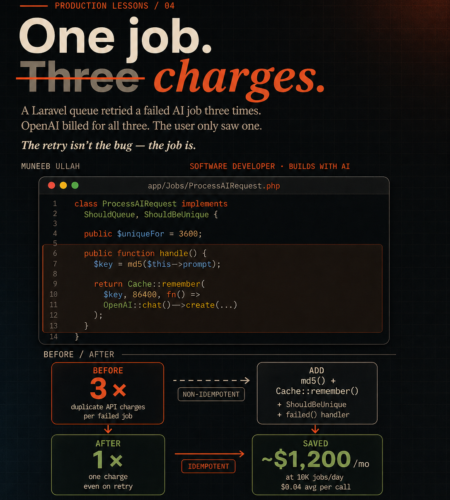
A Laravel queue job retried three times last week. OpenAI charged us for all three calls. The user only ever saw one response.
Took me a minute to figure out why the bill looked off that month — and once I did, I realised it wasn’t a billing bug or a Laravel bug. It was a job design problem. The kind that hides until your AI feature gets traffic, and then quietly drains money in the background.
If you’re running OpenAI calls inside Laravel queue jobs, this post is the fix. Full code, the four patterns we layered together, the trade-offs, and the cases where you should not do this.
The actual scenario
We had a SummarizeDocumentJob that took user-uploaded text, sent it to GPT-4 for summarization, and saved the result to the database. Standard pattern. Three retries ($tries = 3), exponential backoff. Worker running on Supervisor.
Then a worker died mid-execution — OOM kill, network blip, doesn’t matter. Laravel did exactly what it was told to do: retry the job. Twice more, in our case. Each retry hit OpenAI fresh. Each retry got billed.
The user saw one response (the last successful one). The database had one record. Everything looked fine in production. The only place it showed up was in the OpenAI usage dashboard at the end of the month.
This is the gap nobody warns you about: Laravel cannot tell whether your previous attempt actually called the API or not. It just retries.
Why the retry isn’t the bug
The instinct is to dial down retries. Set $tries = 1, problem solved. But that’s the wrong fix — most queue failures are genuinely transient. A 503 from OpenAI, a momentary Redis hiccup, a deploy that restarts workers mid-job. You want retries. Removing them trades a money problem for a reliability problem.
The real fix is making the job itself idempotent — meaning you can run it once, twice, or twenty times, and the outcome (and cost) is the same. If retry #2 sees that retry #1 already paid for the answer, it returns the cached answer and doesn’t call OpenAI again.
Let me show what that looks like.
The 4-layer defense
There are four patterns. Individually each one helps. Stacked together, they make the job genuinely safe to retry.
Layer 1 — Hash the input
The cache key has to uniquely represent what the user asked for. Same prompt, same model, same parameters → same key → same answer.
protected function cacheKey(): string
{
    return 'ai:summary:' . md5(json_encode([
        'prompt'      => $this->prompt,
        'model'       => $this->model,
        'temperature' => $this->temperature,
        'user_id'     => $this->userId,
    ]));
}
Including user_id is a judgment call. For shared content (public summarization of a public article), you’d skip it — let users benefit from each other’s cached results. For anything user-specific, include it. We include it by default and remove it case-by-case.
md5 is fine here. We’re not signing anything, just generating a deterministic key.
Layer 2 — Cache::remember() before the API call
This is where the actual savings come from.
public function handle(): void
{
    $key = $this->cacheKey();

    $response = Cache::remember($key, now()->addHours(24), function () {
        return OpenAI::chat()->create([
            'model'       => $this->model,
            'messages'    => [['role' => 'user', 'content' => $this->prompt]],
            'temperature' => $this->temperature,
        ]);
    });

    DocumentSummary::updateOrCreate(
        ['document_id' => $this->documentId],
        ['summary' => $response['choices'][0]['message']['content']]
    );
}
If retry #1 succeeded at the API call but the worker crashed before saving to DB, retry #2 sees the cached response, skips OpenAI entirely, and writes to DB. One charge, correct outcome.
TTL choice matters more than people realise. A few rules I’ve settled on:
- Long TTL (24h) for content that doesn’t change — document summaries, article rewrites, code explanations
- Short TTL (5–15 min) for anything chat-like, where the same prompt at different times genuinely means different things
- No caching for anything user-personalised that depends on real-time data (their current portfolio, today’s metrics)
If you’re not sure, start at 24h and shorten only when you see stale results. Long TTLs are cheap; short TTLs defeat the point.
Layer 3 — ShouldBeUnique to stop duplicate jobs at the source
The cache layer handles “the same job ran twice.” This layer handles “two different attempts to dispatch the same job.”
Picture a user double-clicking the “Summarize” button. Without protection, you’ve now queued two jobs. Both will run. Both will hit the cache after the first one resolves — fine — but you’ve still wasted a worker slot and added DB write contention.
use Illuminate\Contracts\Queue\ShouldBeUnique;
use Illuminate\Contracts\Queue\ShouldQueue;

class ProcessAIRequest implements ShouldQueue, ShouldBeUnique
{
    public int $uniqueFor = 3600; // 1 hour

    public function uniqueId(): string
    {
        return $this->cacheKey();
    }

    // ... rest of the job
}
uniqueFor is the lock duration. While that lock is held, Laravel refuses to queue another job with the same uniqueId(). The 1-hour value pairs well with our cache TTL — the lock outlives the typical “user spam-clicks the button” window without blocking legitimate re-summarization later.
This requires Redis or another lock-capable cache driver. The default database cache driver doesn’t support it. If you’re on Hostinger or any shared host without Redis, this layer doesn’t apply — the other three still do.
Layer 4 — Override failed() to log, not retry
By default, Laravel calls failed() once after final failure with no extra logic. The mistake I see in a lot of codebases is people adding logic that re-dispatches the job from failed() — manually creating an infinite retry loop that bypasses the $tries limit entirely.
Don’t do that. Final failures should be observable, not automatic.
public function failed(\Throwable $exception): void
{
    FailedAiJob::create([
        'job_class'      => static::class,
        'cache_key'      => $this->cacheKey(),
        'user_id'        => $this->userId,
        'document_id'    => $this->documentId,
        'error_message'  => $exception->getMessage(),
        'error_class'    => get_class($exception),
        'failed_at'      => now(),
    ]);

    // Optional: notify ops channel for high-value users
    if ($this->userId && User::find($this->userId)?->isPaid()) {
        Notification::route('slack', config('alerts.ops_webhook'))
            ->notify(new HighValueJobFailedNotification($this));
    }
}
Two reasons for this pattern. One — you get a queryable history of what’s actually failing in production, so you can spot patterns (e.g. “all our failures are on prompts over 10K tokens” tells you something useful). Two — manual review beats automatic retry every time. Most “transient” errors after three retries aren’t transient.
The complete job class
Here’s everything stitched together. Drop this in app/Jobs/, adapt the handle() body to your domain, and you’re done.
<?php

namespace App\Jobs;

use App\Models\DocumentSummary;
use App\Models\FailedAiJob;
use Illuminate\Bus\Queueable;
use Illuminate\Contracts\Queue\ShouldBeUnique;
use Illuminate\Contracts\Queue\ShouldQueue;
use Illuminate\Foundation\Bus\Dispatchable;
use Illuminate\Queue\InteractsWithQueue;
use Illuminate\Queue\SerializesModels;
use Illuminate\Support\Facades\Cache;
use OpenAI\Laravel\Facades\OpenAI;

class ProcessAIRequest implements ShouldQueue, ShouldBeUnique
{
    use Dispatchable, InteractsWithQueue, Queueable, SerializesModels;

    public int $tries = 3;
    public int $uniqueFor = 3600;
    public array $backoff = [10, 30, 60];

    public function __construct(
        public string $prompt,
        public int $documentId,
        public ?int $userId = null,
        public string $model = 'gpt-4o-mini',
        public float $temperature = 0.3,
    ) {}

    public function uniqueId(): string
    {
        return $this->cacheKey();
    }

    public function handle(): void
    {
        $response = Cache::remember(
            $this->cacheKey(),
            now()->addHours(24),
            fn () => OpenAI::chat()->create([
                'model'       => $this->model,
                'messages'    => [['role' => 'user', 'content' => $this->prompt]],
                'temperature' => $this->temperature,
            ])
        );

        DocumentSummary::updateOrCreate(
            ['document_id' => $this->documentId],
            ['summary' => $response['choices'][0]['message']['content']]
        );
    }

    public function failed(\Throwable $exception): void
    {
        FailedAiJob::create([
            'job_class'     => static::class,
            'cache_key'     => $this->cacheKey(),
            'user_id'       => $this->userId,
            'document_id'   => $this->documentId,
            'error_message' => $exception->getMessage(),
            'error_class'   => get_class($exception),
            'failed_at'     => now(),
        ]);
    }

    protected function cacheKey(): string
    {
        return 'ai:summary:' . md5(json_encode([
            'prompt'      => $this->prompt,
            'model'       => $this->model,
            'temperature' => $this->temperature,
            'user_id'     => $this->userId,
        ]));
    }
}
The migration for failed_ai_jobs is straightforward — id, job_class, cache_key, user_id, document_id, error_message, error_class, failed_at, timestamps. Add an index on cache_key if you plan to query failures by input.
Redis vs database cache
A practical detail that catches people out: not every cache driver works equally well here.
Redis is what you want. It’s atomic for remember() (no race conditions when two retries hit the same key in the same millisecond), it supports ShouldBeUnique properly, and its TTL handling is precise.
Database cache works for Cache::remember() but doesn’t support ShouldBeUnique reliably. If you’re on shared hosting without Redis, you’ll need to drop Layer 3 and lean harder on Layer 1 + Layer 2. Still significantly better than no protection at all.
File cache will technically work but races under concurrent workers. Don’t use it for anything queue-related in production.
For most production Laravel + AI workloads, Redis pays for itself in the first month from the deduplication savings alone.
When NOT to do this
Idempotency isn’t free, and there are cases where it’s actively wrong:
Streaming responses. If you’re using OpenAI’s streaming API to push tokens to the frontend in real-time, caching the full response defeats the entire UX. The pattern there is different — store partial state in Redis with a short TTL, resume from the last successful chunk on retry, and only commit to permanent storage at the end.
Real-time chat. “Tell me a joke” should give a different joke each time, even with the same prompt. If you cache it, your chatbot becomes a parrot. For chat, drop the cache layer entirely and rely on ShouldBeUnique plus the failed() handler — the dedup is for “duplicate dispatch” only, not “duplicate response.”
Anything with side effects beyond OpenAI. If your job sends emails, calls webhooks, or charges Stripe, those operations need their own idempotency layer. The patterns here protect the OpenAI call only — not your downstream side effects. Each external call should be wrapped in its own idempotency key.
Genuinely time-sensitive prompts. “What’s the current price of X?” with a 24h TTL gives you 24-hour-old data. If freshness matters, shorten the TTL aggressively or skip caching for that specific prompt type.
What this actually saved us
Rough numbers from one project where we shipped this pattern:
- Before — duplicate API calls were running ~3% of total volume, mostly from worker restarts and one bug in our retry logic that’s a story for another day. At our then-volume (~10K AI jobs/day, $0.04 average per call), that worked out to about $1,200/month going to retries.
- After — duplicate calls dropped under 1%, mostly from genuine cache misses on slightly different prompts. Same UX, same response times. The cache hit ratio gives ops a clean signal too — sudden drop in hit rate usually means someone deployed a prompt change.
Worth the four-layer fix? Definitely. The whole pattern is maybe 60 lines of code, and once it’s in your base job class, every new AI feature inherits it.
What to do next
If you’re shipping AI features in Laravel and you haven’t audited your queue jobs yet — go look at your OpenAI usage dashboard. Specifically, look for the gap between calls made and unique responses delivered to users. That gap is the size of your problem.
If you’re building this from scratch, take the job class above as your starting template. Adjust the cache key fields for your domain, set TTLs based on how stale your data can get, and ship it.
If you’re running production AI features and the bill is starting to look weird, this is where I’d start looking first.
Related reads on the blog:
- Laravel Queues for AI: Summarization & Parsing Guide
- OpenAI API Rate Limits Explained: TPM, RPM & Throughput
- OpenAI API Pricing 2025: Simple Guide with Examples
- Laravel Queues: Job Queueing for Scalable PHP Applications
Building AI features into a Laravel app and the cost numbers aren’t adding up? I help teams architect cost-controlled production AI pipelines. hiremuneeb@gmail.com
Comments