
Search is no longer only about getting ten blue links.
People are increasingly discovering websites through experiences such as:
- Google AI Overviews
- Google AI Mode
- ChatGPT Search
- AI assistants that retrieve information from the web
This has created a new question for website owners:
Can AI search systems actually discover, access, understand, and retrieve your website?
That is where Technical GEO becomes useful.
I use Technical GEO as a practical term for the technical layer of Generative Engine Optimization (GEO): making sure your website is accessible and understandable to the systems that power AI-assisted search.
It is not a replacement for technical SEO.
In fact, Google explicitly says that its generative search experiences are rooted in its existing Search ranking and quality systems. For Google, GEO and AEO are still fundamentally part of SEO.
The difference is that we now need to think beyond:
Can Google index this page?
and also consider:
Can AI-powered retrieval systems reliably discover, interpret, retrieve, and reference this information?
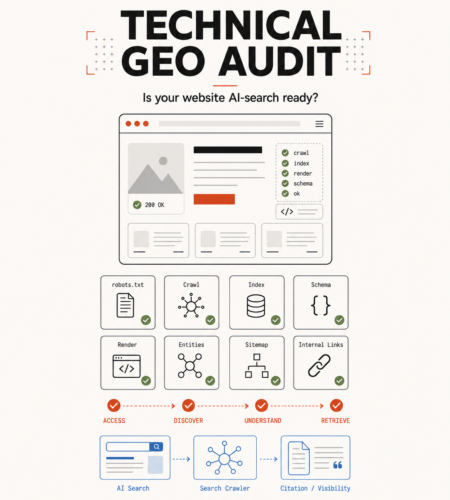
This guide walks through the Technical GEO audit I would perform on a modern website.
What Is Technical GEO?
Traditional technical SEO usually focuses on this pipeline:
Website
   ↓
Crawling
   ↓
Rendering
   ↓
Indexing
   ↓
Ranking
   ↓
Search Result
AI search adds another retrieval layer:
Website
   ↓
Crawling
   ↓
Rendering
   ↓
Indexing / Retrieval
   ↓
AI Search System
   ↓
Relevant Information Retrieval
   ↓
Generated Answer
   ↓
Citation / Supporting Link
Google, for example, describes using retrieval-augmented generation and its existing Search index to retrieve current web pages for generative responses.
Google AI Mode and AI Overviews may also perform query fan-out, where the system runs multiple related searches to gather information about different parts of a user’s question.
This means your website may become relevant to searches that don’t exactly match the keyword you originally optimized for.
The technical foundation therefore matters.
If a system cannot reliably:
- crawl your pages,
- render your content,
- determine the canonical URL,
- understand the page,
- identify important entities,
- or retrieve the information,
your content starts with a disadvantage.
Technical GEO Is Not a Collection of AI Hacks
Before auditing anything, there is an important misconception to remove.
You do not need a completely separate website architecture for Google AI Mode or AI Overviews.
Google currently states that pages appearing as supporting links in these features need to be indexed and eligible to appear in normal Google Search with a snippet. There are no additional technical requirements specifically for AI Mode or AI Overviews.
So Technical GEO should not mean:
Normal SEO
+
random AI hacks
+
new files everywhere
+
dozens of unnecessary schema types
A better model is:
Strong Technical SEO
        +
AI Crawler Awareness
        +
Clear Entity Signals
        +
Machine-Readable Structure
        +
Retrievable Content
        +
AI Visibility Measurement
Let’s audit each layer.
1. Check Whether AI Search Systems Can Crawl Your Website
Start with the most basic question:
Are you accidentally blocking the systems that need to discover your content?
Check:
/robots.txt
For Google AI Overviews and AI Mode, Googlebot remains the important crawler control because these experiences are integrated with Google Search.
A simple configuration might look like:
User-agent: Googlebot
Allow: /
But robots.txt is only one layer.
Also check:
- Cloudflare
- CDN rules
- Web Application Firewall
- bot protection
- hosting firewall
- IP restrictions
- security plugins
- rate limiting
A perfectly configured robots.txt file will not help if your CDN returns:
403 Forbidden
to the crawler.
Google specifically recommends checking both robots.txt and CDN/hosting infrastructure when diagnosing visibility in its AI features.
Technical GEO check
Test important URLs as crawlers, not only through your browser.
Your homepage may return:
200 OK
to you while a bot receives:
403
429
503
That is a discoverability problem before it is an SEO problem.
2. Treat ChatGPT Search and GPT Training Separately
This is one area where Technical GEO goes beyond the traditional Google-only audit.
OpenAI currently documents multiple web agents with different purposes.
Two important ones are:
OAI-SearchBot
GPTBot
They are not the same thing.
OAI-SearchBot is used for surfacing websites in ChatGPT’s search features.
GPTBot is used to crawl content that may be used to improve and train OpenAI’s generative AI foundation models.
OpenAI says these controls are independent. A website can allow OAI-SearchBot while disallowing GPTBot.
For example:
User-agent: OAI-SearchBot
Allow: /

User-agent: GPTBot
Disallow: /
This configuration communicates:
ChatGPT Search discovery → Allowed

Model training crawl → Disallowed
That distinction is important.
Blocking every “AI bot” without understanding its purpose could unintentionally reduce your AI search visibility.
OpenAI currently states that sites opted out of OAI-SearchBot will not be shown in ChatGPT search answers, although they may still appear as navigational links.
So don’t create one generic rule for every AI crawler.
Know what each crawler does first.
3. Check Indexability, Not Just Crawlability
Crawling and indexing are different.
A crawler may successfully fetch:
https://example.com/service
while the page contains:
<meta name="robots" content="noindex">
The page is technically accessible but intentionally excluded from the index.
Your Technical GEO audit should therefore inspect:
noindexnofollow- X-Robots-Tag headers
- canonical tags
- HTTP status codes
- redirects
- authentication requirements
For Google’s generative Search features, being indexed is currently a prerequisite for eligibility as a supporting link.
A page that isn’t indexable cannot be fixed with better GEO copy.
Fix the infrastructure first.
4. Verify HTTP Status Codes
This sounds basic, but modern JavaScript applications frequently get this wrong.
For example:
/product/non-existing-product
visually displays:
Product not found
but the server returns:
HTTP 200
That is a soft error.
Your server should communicate the actual state:
Valid page       → 200
Moved page       → 301 / 308
Missing page     → 404 / 410
Authentication   → 401
Forbidden        → 403
Server failure   → 5xx
Google uses HTTP status codes to understand what happened when crawling a page.
Technical GEO cannot compensate for an application that sends misleading HTTP responses.
5. Audit JavaScript Rendering
This is particularly important for:
- React
- Next.js
- Vue
- Angular
- SPA applications
- heavily client-rendered ecommerce sites
Suppose your server initially returns:
<body>
    <div id="root"></div>
</body>
and JavaScript later generates:
<h1>Enterprise Warehouse Management Software</h1>

<p>
Our warehouse management system helps...
</p>
A human using Chrome sees the content.
But whether a crawler sees it depends on its rendering capabilities.
Google processes JavaScript through three main stages:
Crawling
   ↓
Rendering
   ↓
Indexing
Google can render JavaScript, but Google itself recommends server-side or pre-rendering where appropriate, noting that not every bot can execute JavaScript.
That matters even more when thinking about multiple AI retrieval systems.
Better architecture
Where SEO and discoverability matter, I generally prefer important content to exist in the initial HTML through:
- SSR
- SSG
- ISR
- server-generated HTML
rather than relying entirely on client-side JavaScript.
For example:
Request
   ↓
Server
   ↓
HTML containing:
   H1
   Description
   Main content
   Links
   Metadata
   Structured data
   ↓
Browser / Crawler
JavaScript can enhance the experience afterward.
This gives both humans and machines a stronger baseline.
6. Make Important Information Available as Text
Imagine this pricing page:
Hero image with pricing inside image
+
interactive calculator
+
icons
+
JavaScript modal
but almost no useful text exists in the HTML.
Humans may understand it perfectly.
Retrieval systems have a harder job.
Google specifically recommends making important content available in textual form for AI search visibility.
If something matters, represent it as actual content:
<h2>Professional Plan</h2>

<p>
The Professional plan includes unlimited projects,
20 team members and API access.
</p>
rather than embedding that information only inside:
PNG
Canvas
Animation
Video
Use visual content to support information.
Don’t make it the only place the information exists.
7. Audit Your Internal Linking
A page can be technically indexable and still be difficult to discover.
Consider:
Homepage
   ↓
Services
   ↓
AI Development
versus:
Homepage

AI Development page exists somewhere
but nothing links to it.
The second is effectively an orphan page.
Google recommends making important content discoverable through internal links, and its sitemap documentation notes that well-linked pages are generally easier for crawlers to discover.
For Technical GEO, your internal architecture should also communicate topical relationships.
For example:
GEO & AI Search
│
├── Technical GEO Audit
│
├── OAI-SearchBot vs GPTBot
│
├── llms.txt Analysis
│
├── Structured Data for AI Search
│
└── Measuring AI Search Visibility
This is useful for users.
It also creates a clear topical structure.
Your important pages should not exist as isolated articles.
They should form connected knowledge clusters.
8. Maintain a Clean XML Sitemap
Your sitemap is not an AI-specific technology.
It is still useful.
Google describes a sitemap as a file that communicates important URLs and information such as when pages were last updated. It can help search engines crawl larger, newer or more complex websites efficiently.
A Technical GEO sitemap audit should check for:
- canonical URLs only
- no 404 URLs
- no redirecting URLs
- no
noindexURLs - accurate
lastmod - important pages included
- obsolete pages removed
Example:
<url>
  <loc>https://example.com/technical-geo/</loc>
  <lastmod>2026-08-14</lastmod>
</url>
Don’t treat the sitemap as a dumping ground containing every URL your application can generate.
It should represent pages you actually want discovered.
9. Fix Canonicalization and Duplicate URLs
Modern applications can generate multiple URLs representing effectively the same content:
/product?id=100
/product/100
/products/widget
/products/widget?utm_source=linkedin
Which one is authoritative?
Machines shouldn’t have to guess.
Use consistent canonicalization:
<link
  rel="canonical"
  href="https://example.com/products/widget"
/>
Google recommends canonical tags to identify the preferred version of duplicate pages and notes that duplicate URLs can waste crawling resources.
Technical GEO requires the same discipline.
You want one clear source of truth for each important piece of information.
10. Use Structured Data—But Don’t Treat It as a GEO Trick
Structured data is valuable because it provides explicit information about the meaning of a page.
Google says structured data can help it understand things such as:
- people
- organizations
- products
- articles
- events
- recipes
and potentially enable richer search experiences.
For a personal brand, for example:
{
  "@context": "https://schema.org",
  "@type": "Person",
  "name": "Muneeb Ullah",
  "url": "https://muneebdev.com/"
}
For an article:
{
  "@context": "https://schema.org",
  "@type": "Article",
  "headline": "Technical GEO Audit",
  "author": {
    "@type": "Person",
    "name": "Muneeb Ullah"
  }
}
But there is an important distinction.
Google explicitly says there is no special schema.org markup required for its generative search features, and structured data is not a special shortcut into AI Overviews or AI Mode.
So use schema because it improves machine-readable clarity and supports your wider SEO architecture.
Don’t add:
20 irrelevant schema types
because someone promised:
“This makes ChatGPT cite you.”
That claim is not supported by Google’s guidance.
11. Strengthen Entity Consistency
Technical GEO is not only about pages.
It is also about making important entities unambiguous.
Suppose a website repeatedly refers to:
MuneebDev
Muneeb Ullah
Software Developer
muneebdev.com
Your site should clearly communicate the relationship between those entities.
For example:
Muneeb Ullah
      │
      ├── Website → MuneebDev
      ├── Profession → Software Developer
      ├── GitHub → same identity
      ├── LinkedIn → same identity
      └── Articles → authored by same person
Useful technical signals include:
Person schema
Organization schema where applicable
Author pages
Consistent canonical URLs
sameAs properties
Consistent profile information
Clear About page
Structured data can provide search systems with explicit clues about people and organizations represented on a page.
The goal isn’t to create artificial entities.
The goal is to remove unnecessary ambiguity around real ones.
12. Don’t Hide Your Best Information Behind UI Interactions
Consider a FAQ implemented like this:
Question
   ↓
JavaScript click
   ↓
API request
   ↓
Answer loaded dynamically
If the answer isn’t present until someone interacts with the page, some crawlers or retrieval systems may never encounter it.
Similarly, important content should not exist only behind:
- tabs
- login walls
- search boxes
- hover states
- infinite scroll
- client-side API calls
- canvas elements
Google’s current guidance emphasizes making important content available in textual form and crawlable through normal site architecture.
Think:
progressive enhancement, not hidden knowledge.
13. Check Your Snippet Controls
Technical teams sometimes unknowingly prevent their content from being used effectively in search results.
Common directives include:
<meta name="robots" content="nosnippet">
or:
<meta name="robots" content="max-snippet:0">
Google says controls such as:
nosnippet
data-nosnippet
max-snippet
noindex
can limit how information from pages is presented within Search, including its AI features.
So during a Technical GEO audit, don’t only ask:
Is this page indexed?
Also ask:
Have we restricted how much information search systems are permitted to show from it?
Sometimes those restrictions are intentional.
Sometimes they are leftovers from staging environments.
14. Audit Content Extraction, Not Just Page Design
Open an important page and mentally remove:
CSS
animations
navigation
ads
popups
visual effects
What remains?
Ideally:
Clear title
Clear introduction
Logical headings
Useful paragraphs
Lists where appropriate
Tables where appropriate
Sources
Author information
Last updated information
Relevant internal links
This does not mean writing specifically for machines.
Google explicitly advises against rewriting content into some artificial “AI format” or splitting everything into tiny chunks just to influence generative search.
Good structure is useful because it makes content easier for humans to understand.
Machines benefit from that clarity too.
15. Check Whether Your Content Is Actually Worth Retrieving
Technical accessibility only creates eligibility.
It does not create authority.
You could perfectly optimize:
robots.txt
schema
sitemap
SSR
canonical
internal links
and still have content that says exactly what 500 other websites say.
Google’s current generative-search guidance puts strong emphasis on unique, useful, first-hand and non-commodity content rather than simply reproducing information already available elsewhere.
For example:
Commodity content
10 Benefits of AI for Businesses
Stronger content
What Happened When We Added RAG to 1.6 Million Words of Multilingual Content
The second has something machines—and humans—cannot simply reconstruct from common knowledge.
Technical GEO gets your content through the door.
Original expertise gives systems a reason to retrieve it.
16. Think About Query Fan-Out
This is one of the most interesting differences between classic keyword thinking and modern AI search.
Imagine a user asks:
What’s the best architecture for adding AI search to an existing SaaS without exposing customer data?
An AI search system might investigate related concepts such as:
AI search SaaS architecture
RAG data isolation
multi-tenant vector database
LLM security
AI permissions
SaaS privacy
Google confirms that AI Mode and AI Overviews may perform multiple related searches through query fan-out.
So instead of creating six thin pages targeting six keyword variations, build one authoritative resource that genuinely covers the problem.
The technical implication is that your site architecture should make related expertise easy to discover.
Think in:
Entities
Problems
Relationships
Subtopics
Supporting evidence
not only exact-match keywords.
17. Monitor AI Crawlers in Your Server Logs
Google Search Console is useful.
Your server logs tell you something different:
Who actually requested your website?
Depending on your stack, inspect:
Nginx access logs
Apache logs
Cloudflare logs
AWS logs
GCP logs
Vercel analytics/logs
Look for user agents such as:
Googlebot
OAI-SearchBot
GPTBot
ChatGPT-User
OpenAI also publishes IP ranges for its crawlers, which can help website operators verify crawler traffic instead of trusting the user-agent string alone.
A useful Technical GEO monitoring flow is:
Crawler Request
      ↓
User Agent
      ↓
IP Verification
      ↓
Requested URL
      ↓
HTTP Response
      ↓
Status Code
      ↓
Frequency
This can reveal issues that keyword tools cannot.
For example:
OAI-SearchBot → /blog/article → 403
You now have a technical problem to investigate.
18. Measure AI Search Visibility Separately
A major improvement arrived in Google Search Console in 2026.
Google introduced dedicated Generative AI performance reports for visibility within generative Search experiences such as AI Overviews and AI Mode.
The reports include information such as:
- impressions
- pages
- countries
- devices
- dates
Google initially began rolling the feature out to a subset of websites.
That means Technical GEO can increasingly become measurable rather than purely speculative.
Your reporting stack might become:
Google Search Console
        +
Google Analytics
        +
Server Logs
        +
Referral Analysis
        +
AI Search Testing
For ChatGPT and other platforms, also monitor referral traffic where available.
But be careful with third-party “AI visibility scores.”
Google explicitly warns that third-party tools do not have access to Google’s internal ranking or AI systems.
Use external tools as indicators.
Not ground truth.
The Technical GEO Audit Framework
I would organize an audit into six layers.
┌──────────────────────────────┐
│ 1. ACCESS                    │
│ robots.txt / firewall / CDN │
└──────────────┬───────────────┘
               ↓
┌──────────────────────────────┐
│ 2. DISCOVERY                 │
│ links / sitemap / URLs       │
└──────────────┬───────────────┘
               ↓
┌──────────────────────────────┐
│ 3. RENDERING                 │
│ HTML / JS / SSR / status     │
└──────────────┬───────────────┘
               ↓
┌──────────────────────────────┐
│ 4. UNDERSTANDING             │
│ structure / schema / entity  │
└──────────────┬───────────────┘
               ↓
┌──────────────────────────────┐
│ 5. RETRIEVABILITY            │
│ useful content / authority   │
└──────────────┬───────────────┘
               ↓
┌──────────────────────────────┐
│ 6. MEASUREMENT               │
│ GSC / logs / referrals       │
└──────────────────────────────┘
If Layer 1 fails, optimizing Layer 5 will not solve the problem.
That is why I consider Technical GEO an infrastructure problem before a content tactic.
Technical GEO Audit Checklist
Use this checklist on your own website.
Crawlability
- Googlebot is not accidentally blocked.
- Relevant AI search crawlers are configured intentionally.
- OAI-SearchBot access has been reviewed.
- CDN and firewall rules are not blocking legitimate crawlers.
- Important resources required for rendering are crawlable.
Indexing
- Important URLs return
200. - No accidental
noindexdirectives exist. - Canonical URLs are correct.
- Redirect chains are minimized.
- Soft-404 pages return proper status codes.
Rendering
- Important content exists in crawlable HTML.
- JavaScript errors do not hide main content.
- Critical pages have been tested without client-side JavaScript.
- SSR, SSG or pre-rendering is considered where appropriate.
Discovery
- Important pages have internal links.
- There are no valuable orphan pages.
- XML sitemap contains canonical, indexable URLs.
- Related content is organized into logical topic clusters.
Structure
- Each page has one clear purpose.
- Headings follow a logical hierarchy.
- Important information is available as text.
- Structured data matches visible page content.
- Relevant Person, Organization, Article or Product entities are clearly defined where appropriate.
Content controls
nosnippethas been reviewed.max-snippetsettings are intentional.data-nosnippetis not hiding critical information.- Important public content is not unnecessarily behind authentication.
Entity signals
- Brand naming is consistent.
- Author identity is clear.
- About pages describe real entities accurately.
- Structured data reflects the visible website.
- External profiles use consistent identity information.
Monitoring
- Google Search Console is configured.
- Generative AI performance reporting is checked where available.
- Analytics tracks AI referral traffic.
- Server logs can identify crawler requests.
- Bot failures such as
403,429, and5xxare monitored.
What Technical GEO Cannot Guarantee
This is important.
Completing every item above does not guarantee:
ChatGPT citation
Google AI Overview inclusion
AI Mode citation
#1 Google ranking
Technical GEO primarily improves:
Accessibility
+
Discoverability
+
Machine readability
+
Retrieval readiness
The search or AI system still decides what information is most relevant and useful for a particular query.
Google explicitly states that even meeting all technical requirements and policies does not guarantee crawling, indexing or serving.
So don’t sell Technical GEO as:
“Add these tags and ChatGPT will recommend you.”
That is not how this works.
Do You Need llms.txt for Technical GEO?
Not for Google Search.
Google currently states that it does not use llms.txt or other special AI text files to determine visibility in Google Search, including its generative AI features.
That does not automatically mean the file is useless for every possible AI system.
It means:
don’t confuse an emerging convention with a universal ranking requirement.
I’ll examine the technical case for llms.txt separately because it deserves its own discussion.
Technical GEO vs Traditional Technical SEO
The two overlap heavily.
| Traditional Technical SEO | Technical GEO |
|---|---|
| Googlebot access | Search + relevant AI crawler access |
| Crawlability | Crawlability |
| Indexability | Indexability / retrieval eligibility |
| Rendering | Cross-system content accessibility |
| Canonicals | Clear authoritative URLs |
| XML sitemap | Discovery |
| Structured data | Entity and machine-readable clarity |
| Internal linking | Topic/entity relationships |
| Search Console | Search Console + AI visibility + logs |
| Rankings | Search + AI retrieval visibility |
Technical GEO is therefore better understood as an extension of good web architecture, not a replacement for SEO.
Where I Would Start
If I inherited a website today and wanted to improve its AI search visibility, I would not begin by creating an llms.txt file.
I would start here:
1. Crawl the website
2. Inspect robots.txt
3. Check AI crawler rules
4. Verify HTTP responses
5. Find noindex mistakes
6. Compare raw HTML vs rendered HTML
7. Fix canonicalization
8. Review sitemap
9. Find orphan pages
10. Validate structured data
11. Strengthen entity consistency
12. Review content quality
13. Inspect server logs
14. Measure AI search visibility
Only after those foundations are clean would I experiment with newer GEO-specific ideas.
Final Thoughts
There is a lot of noise around GEO right now.
New acronyms appear almost every month.
New tools promise to tell you exactly how visible your company is to every AI model.
And new “AI SEO hacks” appear faster than they can be verified.
But the technical foundation is much less mysterious.
For an AI search system to reference your website, your information first needs a path through something like:
Discover
   ↓
Access
   ↓
Render
   ↓
Understand
   ↓
Retrieve
   ↓
Evaluate
   ↓
Reference
You cannot directly control the last two steps.
You can improve the first five.
That is what Technical GEO should focus on.
Not tricks.
Not keyword stuffing for LLMs.
Not adding every new AI file someone posts about on LinkedIn.
Build a website that is technically accessible, clearly structured, machine-readable, trustworthy, and genuinely useful.
That foundation works for traditional search today—and gives your website a much better starting point as AI search continues to evolve.
Frequently Asked Questions
What is Technical GEO?
Technical GEO is the technical side of Generative Engine Optimization: improving a website’s crawlability, rendering, structure, entity clarity and retrieval readiness for AI-powered search experiences. It overlaps heavily with traditional technical SEO.
Is Technical GEO different from technical SEO?
Partially. The foundations are largely the same: crawlability, indexing, rendering, canonicalization, internal links and structured data. Technical GEO additionally considers AI-specific crawler controls, retrieval visibility and monitoring across AI search systems.
How can I optimize my website for Google AI Overviews?
Google currently recommends following its existing SEO fundamentals. Pages must be indexed and eligible to appear in normal Search with a snippet to be eligible as supporting links in AI Overviews or AI Mode.
How can I make my website available to ChatGPT Search?
Review access for OAI-SearchBot. OpenAI identifies this crawler specifically for surfacing websites in ChatGPT’s search features. It is controlled independently from GPTBot.
Can I allow ChatGPT Search but prevent OpenAI model-training crawling?
Yes. OpenAI currently allows site owners to configure OAI-SearchBot and GPTBot independently through robots.txt.
Does schema markup guarantee AI citations?
No. Structured data can help systems understand page information and can support traditional search features, but Google states that no special schema markup is required for its generative search experiences.
Does llms.txt improve Google AI Search rankings?
Google currently says llms.txt is not used as a special signal for Google Search or its generative AI features.
I’m Muneeb Ullah, a software developer who builds with AI. On MuneebDev, I write about the technical decisions behind modern software, AI integrations, and emerging technologies such as Generative Engine Optimization—without treating new technology as a substitute for solid engineering.
Comments