
Introduction
Flask gives developers a lot of freedom when organizing an application. That flexibility is useful for small projects, but as a Flask application grows, a poor folder structure can quickly lead to large route files, circular imports, duplicated logic, difficult testing, and configuration problems.
A scalable Flask project structure should make it clear where routes, business logic, database models, configuration, extensions, templates, and tests belong.
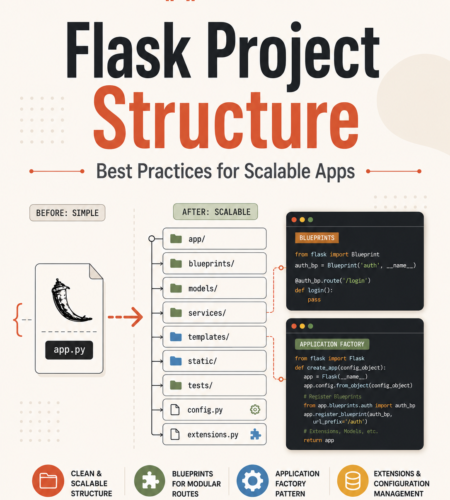
For most production applications, a structure like this is a strong starting point:
myapp/
├── app/
│   ├── __init__.py
│   ├── extensions.py
│   │
│   ├── blueprints/
│   │   ├── auth/
│   │   │   ├── __init__.py
│   │   │   └── routes.py
│   │   └── main/
│   │       ├── __init__.py
│   │       └── routes.py
│   │
│   ├── models/
│   │   ├── __init__.py
│   │   └── user.py
│   │
│   ├── services/
│   │   └── user_service.py
│   │
│   ├── templates/
│   │   ├── base.html
│   │   └── index.html
│   │
│   └── static/
│       ├── css/
│       ├── js/
│       └── images/
│
├── tests/
│   ├── conftest.py
│   ├── test_routes.py
│   ├── test_models.py
│   └── test_services.py
│
├── config.py
├── run.py
├── requirements.txt
├── .env
├── .env.example
└── .gitignore
This structure combines several important Flask practices:
- Application factory pattern
- Feature-based Blueprints
- Centralized extension initialization
- Separate business logic
- Environment-specific configuration
- Dedicated tests
- Clear separation of concerns
If you’re completely new to the framework, read our guide on What is Flask? first.
Otherwise, let’s break down this structure and see how each part works.
Why Flask Project Structure Matters
A small Flask application can work perfectly well in a single file:
from flask import Flask

app = Flask(__name__)

@app.route("/")
def home():
    return "Hello, World!"

if __name__ == "__main__":
    app.run(debug=True)
For a tutorial or quick prototype, there is nothing wrong with this.
Problems begin when the same file starts handling:
- Authentication
- Database models
- API endpoints
- Payments
- Admin functionality
- Configuration
- Background jobs
- External integrations
- Business rules
A single app.py can quickly become difficult to understand and maintain.
A proper Flask folder structure gives your application clear boundaries.
| Benefit | What It Helps With |
|---|---|
| Scalability | Add new modules without restructuring the entire application |
| Maintainability | Find and modify code more easily |
| Testing | Test routes, services, and models independently |
| Collaboration | Give team members predictable places to add code |
| Configuration | Separate development, testing, and production settings |
| Deployment | Prepare the application for containers and production servers |
The goal is not to create as many folders as possible.
The goal is to make the structure grow with the application.
Recommended Flask Project Structure
Let’s look at the main pieces of the structure.
1. app/ — Main Application Package
The app directory contains the application itself.
app/
├── __init__.py
├── extensions.py
├── blueprints/
├── models/
├── services/
├── templates/
└── static/
Its __init__.py file is normally where the Flask application is created.
Instead of creating the app globally, we can use the Flask application factory pattern.
from flask import Flask

from .extensions import db
from .blueprints.main import main_bp
from .blueprints.auth import auth_bp


def create_app(config_class="config.Config"):
    app = Flask(__name__)

    app.config.from_object(config_class)

    db.init_app(app)

    app.register_blueprint(main_bp)
    app.register_blueprint(auth_bp, url_prefix="/auth")

    return app
The function returns a fully configured Flask application.
We’ll examine this pattern in more detail shortly.
2. extensions.py — Initialize Flask Extensions
One common source of circular imports in Flask applications is initializing extensions directly against the application instance.
Instead, create the extension objects independently:
from flask_sqlalchemy import SQLAlchemy

db = SQLAlchemy()
Then initialize them inside create_app():
db.init_app(app)You can keep multiple Flask extensions here:
from flask_sqlalchemy import SQLAlchemy
from flask_migrate import Migrate
from flask_login import LoginManager

db = SQLAlchemy()
migrate = Migrate()
login_manager = LoginManager()
Then connect them to the application:
db.init_app(app)
migrate.init_app(app, db)
login_manager.init_app(app)
This gives the application factory control over extension initialization and reduces tight coupling between modules.
Flask Application Factory Pattern
What Is the Flask Application Factory Pattern?
The Flask application factory pattern creates the Flask application inside a function instead of creating a single global instance.
A simple example looks like this:
from flask import Flask


def create_app():
    app = Flask(__name__)

    return app
You can then configure the application inside that function:
def create_app(config_class="config.Config"):
    app = Flask(__name__)

    app.config.from_object(config_class)

    return app
And add extensions and Blueprints:
from flask import Flask

from .extensions import db
from .blueprints.main import main_bp


def create_app(config_class="config.Config"):
    app = Flask(__name__)

    app.config.from_object(config_class)

    db.init_app(app)

    app.register_blueprint(main_bp)

    return app
Why Use an Application Factory?
The factory pattern becomes particularly useful as the application grows.
Multiple configurations
You can create different application instances for development, testing, and production.
development_app = create_app("config.DevelopmentConfig")
test_app = create_app("config.TestingConfig")
Easier testing
Tests can create isolated application instances without depending on a globally created app.
Cleaner extension initialization
Extensions such as SQLAlchemy can be created independently and initialized after the app is created.
Better modularity
Blueprints, middleware, error handlers, CLI commands, and extensions can all be registered during application creation.
Running an Application Factory
A simple run.py can create the app:
from app import create_app

app = create_app()
During development, Flask can also work directly with application factories when configured appropriately.
The important architectural idea is that application creation happens in one predictable place.
Organizing Flask with Blueprints
As the number of routes grows, placing all routes in one file becomes difficult to maintain.
Flask Blueprints allow related routes to be grouped into modules.
For example:
app/
└── blueprints/
    ├── auth/
    │   ├── __init__.py
    │   └── routes.py
    │
    ├── main/
    │   ├── __init__.py
    │   └── routes.py
    │
    └── admin/
        ├── __init__.py
        └── routes.py
This is often easier to scale than one large routes.py.
Flask Blueprint Example
Create the Blueprint:
app/blueprints/main/__init__.py
from flask import Blueprint

main_bp = Blueprint("main", __name__)

from . import routes
Now create its routes.
app/blueprints/main/routes.py
from flask import render_template

from . import main_bp


@main_bp.route("/")
def home():
    return render_template("index.html")


@main_bp.route("/about")
def about():
    return render_template("about.html")
Register it in the application factory:
from flask import Flask

from .blueprints.main import main_bp


def create_app():
    app = Flask(__name__)

    app.register_blueprint(main_bp)

    return app
Blueprints with URL Prefixes
You can also give a Blueprint a URL prefix.
For example:
app.register_blueprint(auth_bp, url_prefix="/auth")Routes inside that Blueprint might then become:
/auth/login
/auth/register
/auth/logout
For an API:
app.register_blueprint(api_bp, url_prefix="/api/v1")This makes URL organization much cleaner.
Organize Blueprints by Feature
A useful rule for larger Flask projects is:
Organize code around features or domains rather than creating one enormous folder for every technical type.
For example:
blueprints/
├── auth/
├── users/
├── products/
├── orders/
└── admin/
This makes it easier to understand which part of the application owns particular routes.
For larger modules, each Blueprint can contain more than routes:
products/
├── __init__.py
├── routes.py
├── forms.py
├── schemas.py
└── helpers.py
You do not need this complexity for every application.
Start simple and introduce additional separation when the feature actually requires it.
Organizing Database Models
Database models should normally live separately from route handlers.
Example:
app/
└── models/
    ├── __init__.py
    ├── user.py
    ├── product.py
    └── order.py
A simple SQLAlchemy model:
app/models/user.py
from app.extensions import db


class User(db.Model):
    id = db.Column(db.Integer, primary_key=True)

    username = db.Column(
        db.String(80),
        unique=True,
        nullable=False
    )
Keeping models separate makes your database layer easier to locate and maintain.
Add a Service Layer for Business Logic
One of the biggest mistakes in growing Flask projects is putting too much logic inside routes.
Consider this:
@users_bp.route("/users/<username>")
def get_user(username):
    user = User.query.filter_by(username=username).first()

    # More queries
    # Validation
    # Business rules
    # External API calls
    # Email logic

    return ...
Eventually, route handlers become difficult to test and reuse.
Move business logic into services.
app/
└── services/
    ├── user_service.py
    ├── payment_service.py
    └── email_service.py
Example:
app/services/user_service.py
from app.models.user import User


def get_user_by_username(username):
    return User.query.filter_by(
        username=username
    ).first()
The route becomes simpler:
from app.services.user_service import get_user_by_username


@users_bp.route("/users/<username>")
def get_user(username):
    user = get_user_by_username(username)

    if user is None:
        return {"error": "User not found"}, 404

    return {
        "id": user.id,
        "username": user.username
    }
This separation becomes increasingly valuable when business logic is reused by:
- Web routes
- REST APIs
- Background jobs
- CLI commands
- Scheduled tasks
Templates and Static Files
Traditional server-rendered Flask applications normally keep HTML templates inside templates/:
templates/
├── base.html
├── index.html
├── auth/
│   ├── login.html
│   └── register.html
└── admin/
    └── dashboard.html
Example:
<!DOCTYPE html>
<html lang="en">
<head>
    <title>{% block title %}My Flask App{% endblock %}</title>
</head>
<body>
    {% block content %}{% endblock %}
</body>
</html>
Static assets go inside static/:
static/
├── css/
├── js/
└── images/
For example:
<link
    rel="stylesheet"
    href="{{ url_for('static', filename='css/app.css') }}"
>
For API-only Flask applications, you may not need either directory.
Flask Configuration Best Practices
Application configuration should not be scattered throughout route files.
A basic config.py can define shared and environment-specific settings.
import os


class Config:
    SECRET_KEY = os.getenv("SECRET_KEY")
    SQLALCHEMY_TRACK_MODIFICATIONS = False


class DevelopmentConfig(Config):
    DEBUG = True
    SQLALCHEMY_DATABASE_URI = os.getenv(
        "DATABASE_URL",
        "sqlite:///development.db"
    )


class TestingConfig(Config):
    TESTING = True
    SQLALCHEMY_DATABASE_URI = "sqlite:///:memory:"


class ProductionConfig(Config):
    DEBUG = False
    SQLALCHEMY_DATABASE_URI = os.getenv(
        "DATABASE_URL"
    )
Your factory can accept a configuration class:
def create_app(config_class="config.DevelopmentConfig"):
    app = Flask(__name__)

    app.config.from_object(config_class)

    return app
For testing:
app = create_app("config.TestingConfig")And for production:
app = create_app("config.ProductionConfig")Keep Secrets Outside Source Code
Secrets should not be hard-coded into config.py.
Avoid this:
SECRET_KEY = "my-production-secret"Instead:
import os

SECRET_KEY = os.getenv("SECRET_KEY")
A local .env file might contain:
SECRET_KEY=your-local-secret
DATABASE_URL=postgresql://user:password@localhost/myapp
You can load environment variables using python-dotenv where appropriate.
pip install python-dotenvNever commit the real .env file containing credentials.
Instead, commit an example file:
.env.exampleExample:
SECRET_KEY=
DATABASE_URL=
This documents the required variables without exposing real secrets.
Testing Structure for Flask
A scalable Flask project should treat tests as part of the architecture rather than adding them later.
A straightforward structure is:
tests/
├── conftest.py
├── test_routes.py
├── test_models.py
└── test_services.py
As the test suite grows, you can mirror your application structure:
tests/
├── blueprints/
│   ├── test_auth.py
│   └── test_products.py
│
├── services/
│   ├── test_user_service.py
│   └── test_payment_service.py
│
└── models/
    └── test_user.py
Flask Testing with Pytest
Install pytest:
pip install pytestCreate an application fixture.
tests/conftest.py
import pytest

from app import create_app
from app.extensions import db


@pytest.fixture
def app():
    app = create_app("config.TestingConfig")

    with app.app_context():
        db.create_all()

        yield app

        db.session.remove()
        db.drop_all()


@pytest.fixture
def client(app):
    return app.test_client()
Now test a route:
def test_home_route(client):
    response = client.get("/")

    assert response.status_code == 200
The application factory makes this pattern much easier because each test session can create an application using a dedicated testing configuration.
Small vs Medium vs Large Flask Project Structure
There is no single folder structure that every Flask application should use.
Your structure should reflect the application’s complexity.
Small Flask Project
For a very small application:
myapp/
├── app.py
├── templates/
├── static/
└── requirements.txt
Use this when:
- Building a prototype
- Learning Flask
- Creating a tiny internal utility
- Running only a handful of routes
Do not introduce unnecessary architecture before you need it.
Medium Flask Project
Once the app has multiple features, a database, authentication, or tests, move toward:
myapp/
├── app/
│   ├── __init__.py
│   ├── extensions.py
│   ├── blueprints/
│   ├── models/
│   ├── services/
│   ├── templates/
│   └── static/
│
├── tests/
├── config.py
├── run.py
└── requirements.txt
This structure is suitable for many real-world Flask applications.
Large Flask Project
A larger application might require deeper feature boundaries:
myapp/
├── app/
│   ├── __init__.py
│   ├── extensions.py
│   │
│   ├── auth/
│   │   ├── routes.py
│   │   ├── services.py
│   │   ├── forms.py
│   │   └── schemas.py
│   │
│   ├── products/
│   │   ├── routes.py
│   │   ├── services.py
│   │   ├── repositories.py
│   │   └── schemas.py
│   │
│   ├── orders/
│   │   ├── routes.py
│   │   ├── services.py
│   │   └── schemas.py
│   │
│   └── common/
│       ├── exceptions.py
│       └── utilities.py
│
├── tests/
├── migrations/
├── config.py
└── requirements.txt
You might introduce:
- Repository layers
- Schema/serialization layers
- Dedicated API modules
- Domain services
- Background jobs
- Caching
- Message queues
- Logging infrastructure
But these should solve real architectural problems.
Adding complexity purely because an application might become large someday usually makes development harder rather than easier.
REST API Project Structure
For an API-focused Flask application, the structure can be adjusted:
app/
├── __init__.py
├── extensions.py
│
├── api/
│   ├── __init__.py
│   ├── users.py
│   ├── products.py
│   └── orders.py
│
├── models/
├── services/
└── schemas/
Example Blueprint:
from flask import Blueprint, jsonify

api_bp = Blueprint("api", __name__)


@api_bp.route("/status")
def status():
    return jsonify({
        "status": "ok"
    })
Register it:
app.register_blueprint(
    api_bp,
    url_prefix="/api/v1"
)
This provides routes such as:
/api/v1/statusBackground Jobs
Tasks such as:
- Sending emails
- Processing files
- Generating reports
- Synchronizing external APIs
- Processing images
- Running long calculations
should generally not block normal HTTP requests.
A growing Flask application may therefore add a background job system such as Celery.
Your structure might become:
app/
├── tasks/
│   ├── email_tasks.py
│   └── report_tasks.py
Keep background-task orchestration separate from route handlers and reuse your service layer where possible.
Flask Project Structure with Docker
Containerization does not replace good application structure, but a clean structure makes container deployment easier.
A basic project might contain:
myapp/
├── app/
├── tests/
├── config.py
├── run.py
├── requirements.txt
├── Dockerfile
├── .dockerignore
└── .env
A basic Dockerfile:
FROM python:3.12-slim

WORKDIR /app

COPY requirements.txt .

RUN pip install --no-cache-dir -r requirements.txt

COPY . .

CMD ["gunicorn", "run:app", "--bind", "0.0.0.0:8000"]
For production, configuration such as database credentials and secret keys should be injected through the deployment environment rather than baked into the image.
Common Flask Project Structure Mistakes
A good folder structure is not just about what you include. It is also about avoiding patterns that make the application harder to maintain.
1. Keeping Everything in app.py
This usually works initially.
Later, the same file ends up containing:
- Routes
- Models
- Validation
- Business logic
- Database queries
- Authentication
- Configuration
- API calls
Move to modules before one file becomes the entire application.
2. Putting Business Logic Inside Routes
Routes should primarily handle:
- Request input
- Validation
- Calling application logic
- Returning a response
Complex business rules belong in services or other appropriate domain modules.
3. Creating One Giant routes.py
Splitting app.py into one 3,000-line routes.py does not solve the architecture problem.
Group routes by feature using Blueprints.
4. Initializing Extensions Globally Against the App
This can create dependencies that make factories and tests difficult.
Prefer:
db = SQLAlchemy()followed by:
db.init_app(app)inside the application factory.
5. Hard-Coding Secrets
Never place production secrets directly inside committed source files.
Use environment variables or a suitable secrets-management system.
6. Mixing Database Queries Everywhere
If complicated queries are repeated across routes, services, background jobs, and commands, maintenance becomes difficult.
Centralize reusable data-access logic when the complexity justifies it.
7. Creating Too Many Layers Too Early
The opposite problem also exists.
A five-route Flask application probably does not need:
controllers/
repositories/
interfaces/
use_cases/
adapters/
domain/
infrastructure/
Use architecture to reduce complexity—not to manufacture it.
8. No Dedicated Test Structure
If tests are scattered or depend heavily on a globally configured application, they become harder to maintain.
The application factory plus a dedicated tests/ directory gives you a much cleaner testing foundation.
Flask Folder Structure Best Practices
For most growing Flask applications, follow these principles.
Use the application factory
Create the application through create_app() when you need configurable instances, modular initialization, or cleaner testing.
Use Blueprints for feature separation
Group related routes instead of putting every endpoint into one file.
Keep routes thin
Move reusable business logic into services or other appropriate modules.
Centralize extensions
Keep SQLAlchemy, migration tools, authentication extensions, and similar integrations in a predictable location.
Separate configuration
Keep development, testing, and production configuration distinct.
Keep secrets outside the repository
Use environment variables rather than committed credentials.
Add tests early
A clear testing structure becomes increasingly valuable as the application grows.
Scale the architecture gradually
Do not copy a huge enterprise folder structure into a tiny project.
Production-Ready Flask Project Checklist
Before considering your Flask structure ready for a serious application, check the following:
- Application creation is centralized
- Routes are grouped logically
- Large applications use Blueprints
- Database extensions are initialized cleanly
- Business logic is separated from complex route handlers
- Development and production configurations are separate
- Secrets are stored outside source control
.envis excluded from Git.env.exampledocuments required variables- Database models have a predictable location
- Tests live in a dedicated test directory
- Application factory supports test configuration
- Static assets and templates are organized logically
- Production deployments do not rely on Flask’s development server
- Logging and error handling are configured appropriately
- Dependencies are tracked
- The project README explains setup and architecture
Frequently Asked Questions
What is the best Flask project structure?
There is no universal structure for every Flask application. For a growing production project, a strong starting point is an app/ package containing Blueprints, models, services, extensions, templates, and static files, combined with an application factory and a separate tests/ directory.
When should I use Flask Blueprints?
Use Blueprints when your application has multiple groups of related routes or features such as authentication, administration, products, orders, or APIs.
They help keep routes modular without requiring separate Flask applications.
What is the Flask application factory pattern?
The Flask application factory pattern creates the application inside a function such as:
def create_app():
    app = Flask(__name__)

    return app
It makes application initialization easier to configure, test, and extend.
Should Flask business logic be inside routes?
Simple route-specific logic may be fine inside a route handler.
For larger applications, reusable or complex business logic is usually better placed in services or domain-specific modules so routes remain focused on HTTP request and response handling.
Should every Flask project use this full structure?
No.
A tiny Flask application may only need:
app.py
templates/
static/
Introduce Blueprints, services, factories, and deeper folder structures as application complexity increases.
Where should Flask database models go?
A common approach is:
app/
└── models/
Larger projects can split models by feature or domain.
The exact folder name matters less than keeping the structure predictable and consistent.
Conclusion
A good Flask project structure should make the application easier to understand today and easier to extend tomorrow.
For most growing applications, the strongest foundation is:
Application Factory
        ↓
Blueprints
        ↓
Routes
        ↓
Services
        ↓
Models / External Systems
Combined with:
extensions.py
config.py
tests/
templates/
static/
The most important principle is not to follow one folder layout blindly.
Start with the simplest architecture your application needs, then introduce structure as complexity grows.
For a production-oriented Flask application, using Blueprints, an application factory, separated configuration, centralized extensions, a dedicated testing setup, and clear business-logic boundaries gives you a codebase that is considerably easier to scale and maintain.
Comments